Guides
How to secure a webhook: secrets, HMAC signatures, timestamps and IP allowlists
How to secure webhooks: a threat model, shared secrets vs HMAC signatures, timestamps against replays, IP allowlists, and verification code in Node and Python.
A webhook URL is a public door into your systems. Anyone who learns the address can knock, so securing a webhook means proving three things about every request before you act on it: it came from the sender you expect, it wasn't changed on the way, and it isn't an old request being played back.
Short answer: sign the raw request body with HMAC-SHA256 and a shared secret, include a timestamp in what you sign and reject anything older than about five minutes, de-duplicate on an event id, and add an IP allowlist where the sender publishes its addresses. Compare signatures in constant time, verify before you parse, and keep the secret in a vault, not in the URL.
The rest of this guide is a vendor-neutral threat model, how each control maps to real settings on a Fluxo Flow Webhook trigger, and how to verify the signed webhooks Fluxo Flow sends to you, with code. New to the terms? See webhook and HMAC signature in the glossary.
Webhook vs API, in one paragraph
With an API, you call the other system when you want something. With a webhook, the other system calls you when something happens: a payment succeeds, a form is submitted, a run finishes. That inversion is why webhooks need their own security. Your API calls go out with your credentials attached. A webhook arrives at a URL you exposed, and until you check it, you have no idea who sent it.
The threat model
Every webhook defense answers one of these questions. If you can name the threat, you can pick the control and test it.
| Threat | What the attacker does | Control | In a Fluxo Flow Webhook trigger |
|---|---|---|---|
| Spoofing | Sends a fake "payment succeeded" to your URL | Shared secret or, better, an HMAC signature | Auth Mode: Shared Secret, Signature (HMAC) or Secret + Signature |
| Tampering | Changes the amount or email in a real request | HMAC over the raw body | Signature mode signs the exact bytes received |
| Replay | Captures one valid request and resends it later | Signed timestamp with a short window | Reject replayed requests: requires x-fluxo-timestamp within 5 minutes |
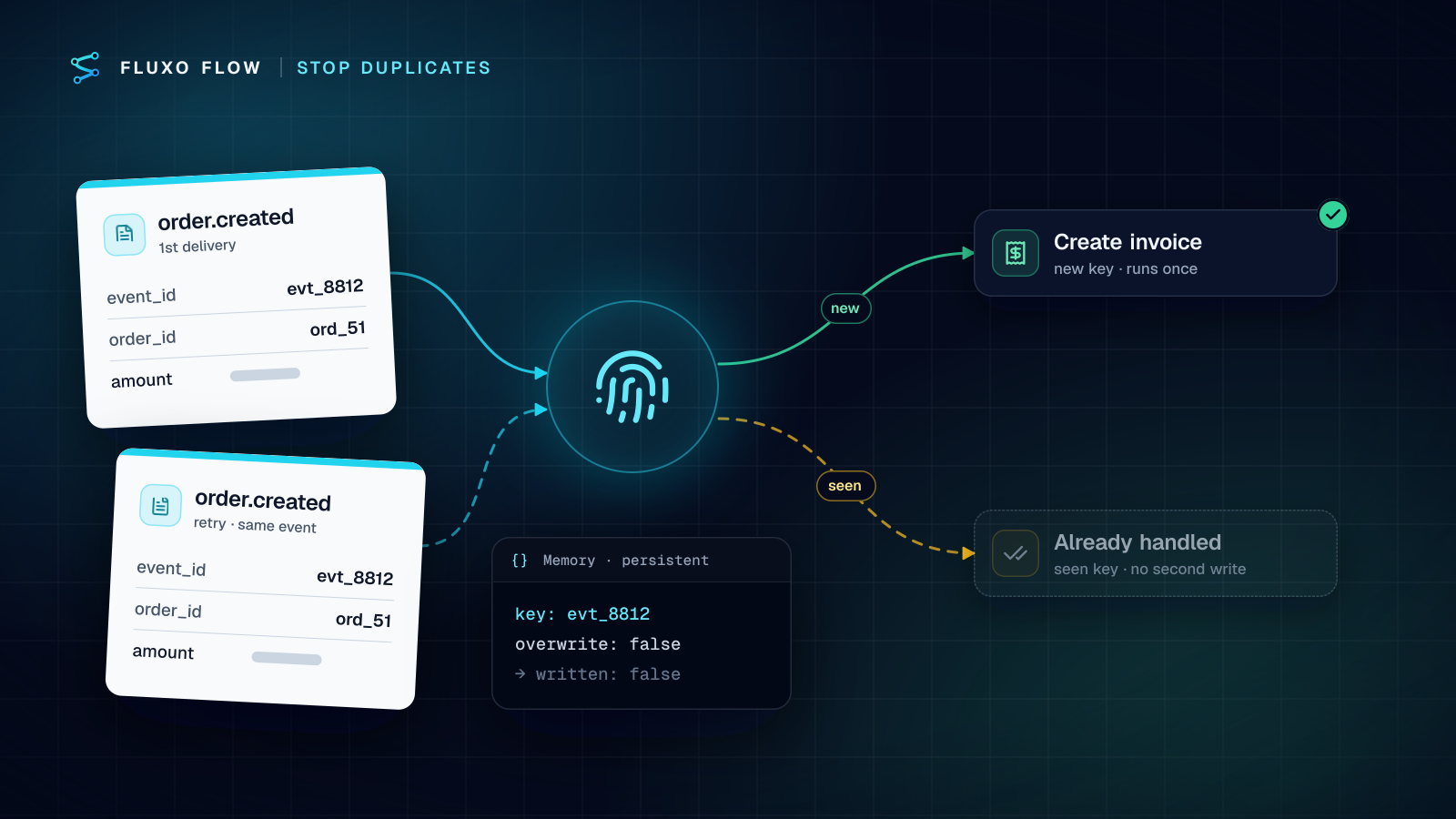
| Duplicate delivery | Not an attack: the sender retries after a timeout | De-duplicate on an event id | Idempotency-Key (or x-fluxo-event-id) is never run twice within 24 hours |
| Source forgery | Sends from an unexpected network | IP allowlist | IP Allowlist: exact IPv4 addresses or CIDR ranges |
| Probing | Guesses URLs to find live workflows | Identical responses for unknown and unconfigured URLs | Unknown or unconfigured workflows get the same 404 |
| Flooding | Sends huge bodies or thousands of requests | Size cap and rate limit | Bodies over 256 KB get a 413; requests are rate-limited per IP and workflow |
| Secret leakage | Reads the secret from a log or a URL | Header-only secrets, redacted logs, vault storage | Secret and signature headers are redacted from stored request logs |
Two lines in that table are worth dwelling on. Replay protection only works if the timestamp is inside the signed content; a timestamp header that isn't signed can simply be edited. And duplicate delivery is the one most teams forget, because it isn't malicious. Stripe, for example, retries failed deliveries for up to three days in live mode and says endpoints "might occasionally receive the same event more than once" (checked October 4, 2026). A workflow that creates an invoice on every delivery will eventually create two.
Shared secret or HMAC signature?
A shared secret header is a password: the sender puts the same value in a header on every request, and you compare it with the one you stored. It stops casual spoofing, and it's the only option for tools that can add a custom header but can't compute a hash (many form builders are like this).
An HMAC signature is stronger in three ways. The secret never travels with the request, so a leaked log line doesn't leak it. The signature covers the body, so tampering is detectable. And when the signed content includes a timestamp, a captured request expires on its own. RFC 2104 defines HMAC; in practice everyone uses HMAC-SHA256.
The big providers all follow this shape, with different header names. GitHub signs with X-Hub-Signature-256. Stripe signs <timestamp>.<body> in Stripe-Signature and its libraries default to a 5-minute tolerance. Slack signs v0:<timestamp>:<body> and recommends rejecting timestamps more than five minutes off. The Standard Webhooks specification tries to unify this with webhook-id, webhook-timestamp and webhook-signature headers. (All checked October 4, 2026.)
Rule of thumb: use a signature whenever the sender can produce one, and use Secret + Signature when you want a cheap first check plus the real one.
Inbound: protecting your workflow's webhook URL
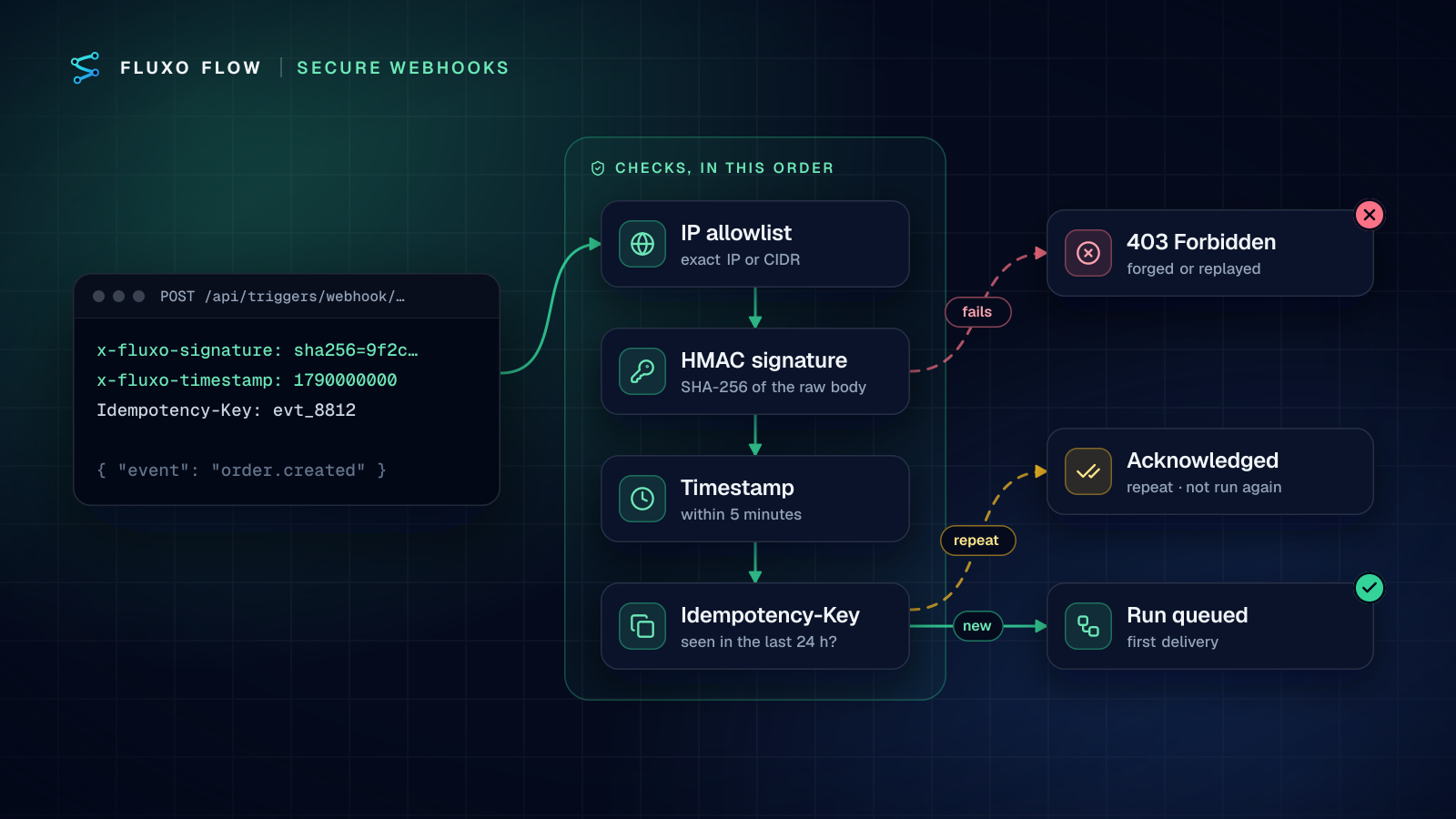
Here is how the controls map to the Webhook trigger's settings in Fluxo Flow, in the order the server applies them.
1. Pick an Auth Mode
The trigger offers None (not recommended), Shared Secret (token header), Signature (HMAC) and Secret + Signature. For Shared Secret you name the Token Header the sender will use. For Signature you name the Signature Header; its value must be sha256= followed by the hex HMAC-SHA256 of the raw body.
2. Keep the secret out of everyone's clipboard history
Leave Webhook Secret Credential empty and a secret is generated when you activate the webhook, shown once with a copy button and stored encrypted. Or pick a credential from your vault if you want to manage the secret yourself, for example to give the same secret to a sender you also call.
3. Turn on "Reject replayed requests"
With this option on, every request must carry an x-fluxo-timestamp header (Unix seconds, within 5 minutes of the server's clock) and the signature must cover <timestamp>.<body> instead of the body alone. Senders that add the timestamp are always checked this way, even with the option off; the option makes it mandatory, so an attacker can't strip the timestamp and fall back to a body-only signature.
4. Send an idempotency key
Have the sender put a unique event id in an Idempotency-Key header (1 to 255 visible ASCII characters). A repeat within 24 hours gets a 200 with duplicate: true and no second run. This is what makes retries, and replays that slip inside the 5-minute window, harmless.
5. Add an IP allowlist and expected headers where you can
IP Allowlist takes comma-separated IPv4 addresses or CIDR ranges and checks the client address set by the hosting edge, not the spoofable X-Forwarded-For header. Use it when the sender publishes its ranges (Stripe does). Expected Headers takes name: value lines that must match exactly, useful for pinning a user-agent or an account id header.
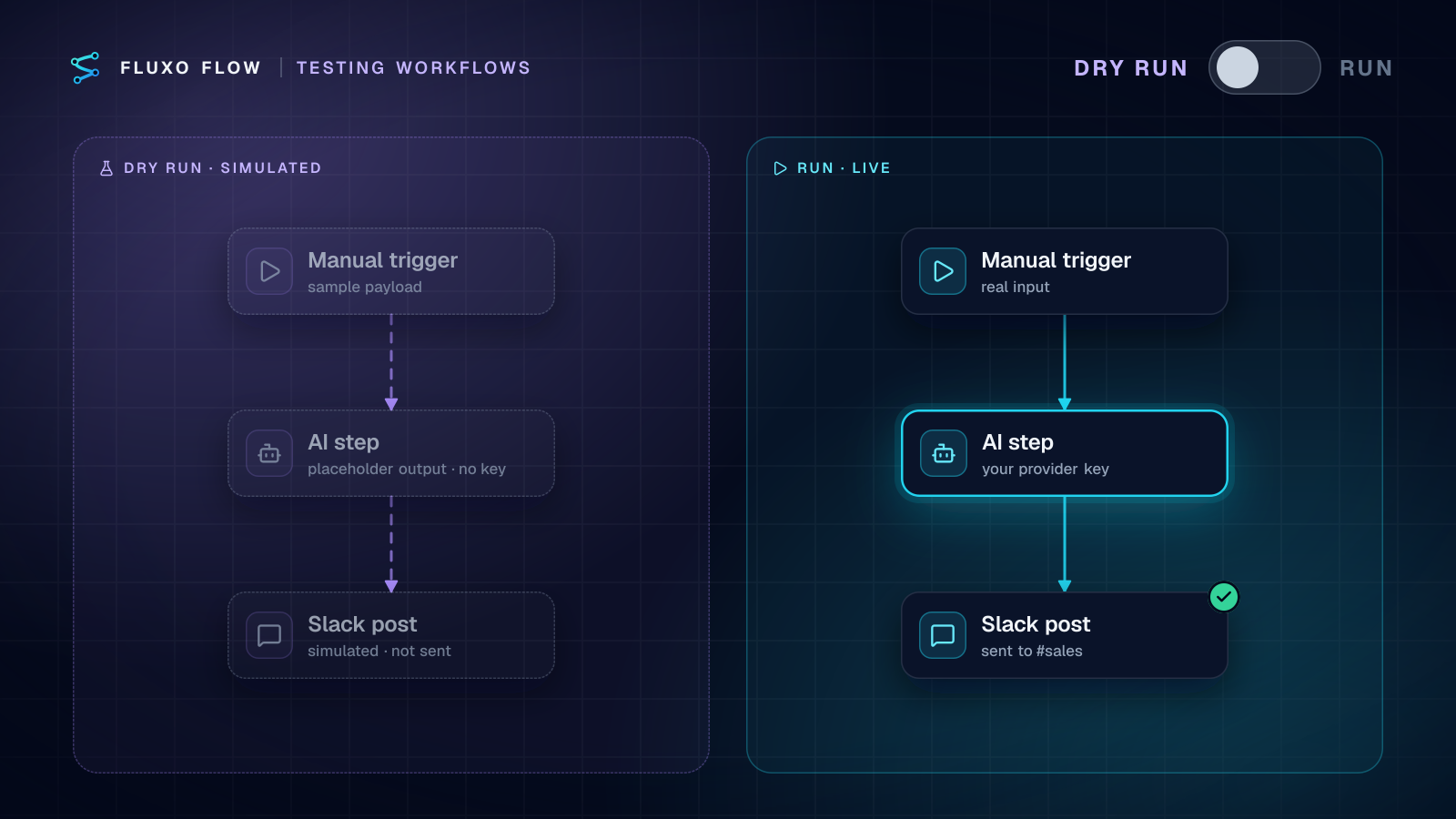
Requests that fail any check get a 403 and never reach the workflow. Accepted requests are queued and run by a separate worker, so nothing heavy happens behind the public URL. One plan note: webhook triggers run live, so they need a paid plan (from Basic); on Free you can build and Dry Run the workflow, and the URL answers 402 until you upgrade.
Signing a request to a Fluxo Flow webhook (Node)
If you control the sender, this is all it takes:
import crypto from "node:crypto";

const body = JSON.stringify({ event: "order.created", order_id: "ord_8812" });
const ts = Math.floor(Date.now() / 1000).toString();
const sig = crypto.createHmac("sha256", process.env.FLUXO_WEBHOOK_SECRET).update(`${ts}.${body}`).digest("hex");

await fetch(process.env.FLUXO_WEBHOOK_URL, {
  method: "POST",
  headers: {
    "content-type": "application/json",
    "x-fluxo-signature": `sha256=${sig}`, // the Signature Header named on the trigger
    "x-fluxo-timestamp": ts,
    "Idempotency-Key": "order.created:ord_8812",
  },
  body, // send exactly the string you signed
});
Note the idempotency key is built from the business event, not a random value per attempt. A random key per retry defeats the purpose.
Outbound: verifying Fluxo-Signature on your server
When you subscribe an endpoint to Fluxo Flow events (run.succeeded, run.failed, review.decided and others) in Settings → API & webhooks, every delivery is signed. The details are in the REST API and webhooks docs; the short version:
Fluxo-Signaturelooks liket=1790000000,v1=5257a8…. The signed string is<t>.<raw body>, HMAC-SHA256 with your endpoint's signing secret, hex-encoded.- Reject timestamps more than 5 minutes old.
- During a secret rotation there are two
v1values; accept either. - Retries reuse the event id, so de-duplicate on it.
X-Fluxo-Signaturecarries the same value for receivers built against the earlier name.
Node (with Express, read the body raw: express.raw({ type: "application/json" })):
import crypto from "node:crypto";

export function verifyFluxoSignature(rawBody, header, secret, toleranceSec = 300) {
  const parts = header.split(",").map((p) => p.split("="));
  const t = parts.find(([k]) => k === "t")?.[1];
  const sigs = parts.filter(([k]) => k === "v1").map(([, v]) => v);
  if (!t || sigs.length === 0) return false;
  if (Math.abs(Date.now() / 1000 - Number(t)) > toleranceSec) return false; // replay guard
  const expected = crypto.createHmac("sha256", secret).update(`${t}.${rawBody}`).digest("hex");
  return sigs.some((s) => s.length === expected.length && crypto.timingSafeEqual(Buffer.from(s), Buffer.from(expected)));
}
Python:
import hashlib, hmac, time

def verify_fluxo_signature(raw_body: bytes, header: str, secret: str, tolerance: int = 300) -> bool:
    items = [p.split("=", 1) for p in header.split(",") if "=" in p]
    t = next((v for k, v in items if k == "t"), None)
    sigs = [v for k, v in items if k == "v1"]
    if not t or not sigs or abs(time.time() - int(t)) > tolerance:
        return False
    expected = hmac.new(secret.encode(), f"{t}.".encode() + raw_body, hashlib.sha256).hexdigest()
    return any(hmac.compare_digest(expected, s) for s in sigs)
Respond with any 2xx within 10 seconds and do the real work afterwards. Failed deliveries are retried on a schedule over about 24 hours, and an endpoint that fails 20 times in a row is switched off automatically, with owners and admins notified.
If you send data out from the middle of a workflow instead (a Publish Output step pointed at a webhook), its HMAC auth mode signs the body with a vault secret and sends X-Fluxo-Signature: sha256=<hex>, and its Idempotency Key field lets you template a key such as order-{{input.order_id}} so your receiver can de-duplicate retries.
The bugs that break verification (or make it useless)
- Parsing before verifying. Your framework turns the body into an object, you
JSON.stringifyit back, and key order or whitespace changes. Verify the raw bytes, then parse. - Comparing with
==. A normal string comparison can return early on the first different byte. Usecrypto.timingSafeEqualorhmac.compare_digest, as GitHub's docs also insist. - Signing the timestamp but never checking it. Without the age check, the timestamp is decoration. And never set the tolerance to 0 in libraries where 0 means "disabled".
- Unsigned timestamps. A timestamp header outside the signed string can be changed freely.
- Hex vs base64. Both sides must agree on the encoding of the digest.
- Clock drift. A server whose clock is minutes off rejects real requests. Keep NTP running.
- Logging the signature header. Logs live longer than secrets should. Redact secret and signature headers.
- A random idempotency key per attempt. The key must be stable across retries of the same event.
Rotating secrets without dropping events
Outbound (Fluxo Flow to you): press Rotate secret on the endpoint. For 24 hours each delivery carries two v1 signatures, old and new, so you can deploy the new secret to your receiver at any point in that window without missing an event.
Inbound (a sender to your workflow): the trigger checks one secret at a time, so rotation is a short cut-over rather than an overlap. Update the vault credential and the sender's secret together in a quiet window. Senders that retry will redeliver anything rejected in between, and the idempotency key keeps those redeliveries from running twice.
Checklist
- HTTPS only; the secret never appears in a URL.
- Auth Mode is Signature (HMAC) or Secret + Signature, not None.
- The secret lives in a vault or was generated and copied once.
- Reject replayed requests is on, and the sender signs
<timestamp>.<body>. - Every event carries a stable
Idempotency-Key. - IP Allowlist set where the sender publishes ranges.
- Receivers verify raw bytes, in constant time, before parsing.
- Receivers check the timestamp age and accept two
v1values during rotation. - Secret and signature headers are redacted in your own logs.
- You have tested a forged request, an old timestamp and a duplicate, and seen each one refused.
That last item matters most. Send yourself a request with a wrong signature, one with a timestamp ten minutes old, and the same valid request twice. You should see a 403, a 403 and a duplicate acknowledgement. If any of them starts a run, fix that before the URL goes anywhere public.
Webhooks are also where untrusted text enters AI workflows, so once the door is locked, read prompt injection in AI workflows for what to do with the content, and stopping duplicate records for making every step after the trigger safe to retry. To see the whole pattern in one place, open the AI enrichment webhook relay template: a signed inbound webhook, strict JSON from the AI step, and a signed, idempotent forward to your API. The platform-side controls are summarized on the security page.
Frequently asked questions
What is HMAC webhook verification?
The sender computes an HMAC (a keyed hash, defined in RFC 2104) of the exact request body with a secret only you and it know, and sends the result in a header. You recompute it on arrival and compare in constant time. A match proves the request came from someone holding the secret and that the body wasn't changed in transit.
Is a secret token in the webhook URL enough?
It's better than nothing, but URLs end up in logs, browser history and screenshots, and the token never changes per request. Send the secret in a header at minimum, and prefer an HMAC signature so the secret itself never travels with the request.
Why doesn't my webhook signature match?
Almost always because the body you signed or verified isn't byte-for-byte the body that was sent: a framework parsed and re-serialized the JSON, whitespace or key order changed, or the encoding differs (hex vs base64). Verify against the raw bytes before any parsing.
Do I still need HTTPS if webhooks are signed?
Yes. A signature proves who sent the request and that it wasn't altered, but it doesn't hide the contents. HTTPS keeps the payload private in transit; the signature and timestamp make it trustworthy.
Put this into practice
Build it on the canvas and Dry Run it on the Free plan, with no credit card. Run it live on a paid plan, on your own AI key.
- security
- webhooks
- reliability
- workflow design