Guides
Duplicate records, retries and failures: making automations safe to re-run
How to prevent duplicate records in automations: why at-least-once delivery creates doubles, and how dedupe keys, find-or-create and idempotency keys stop them.
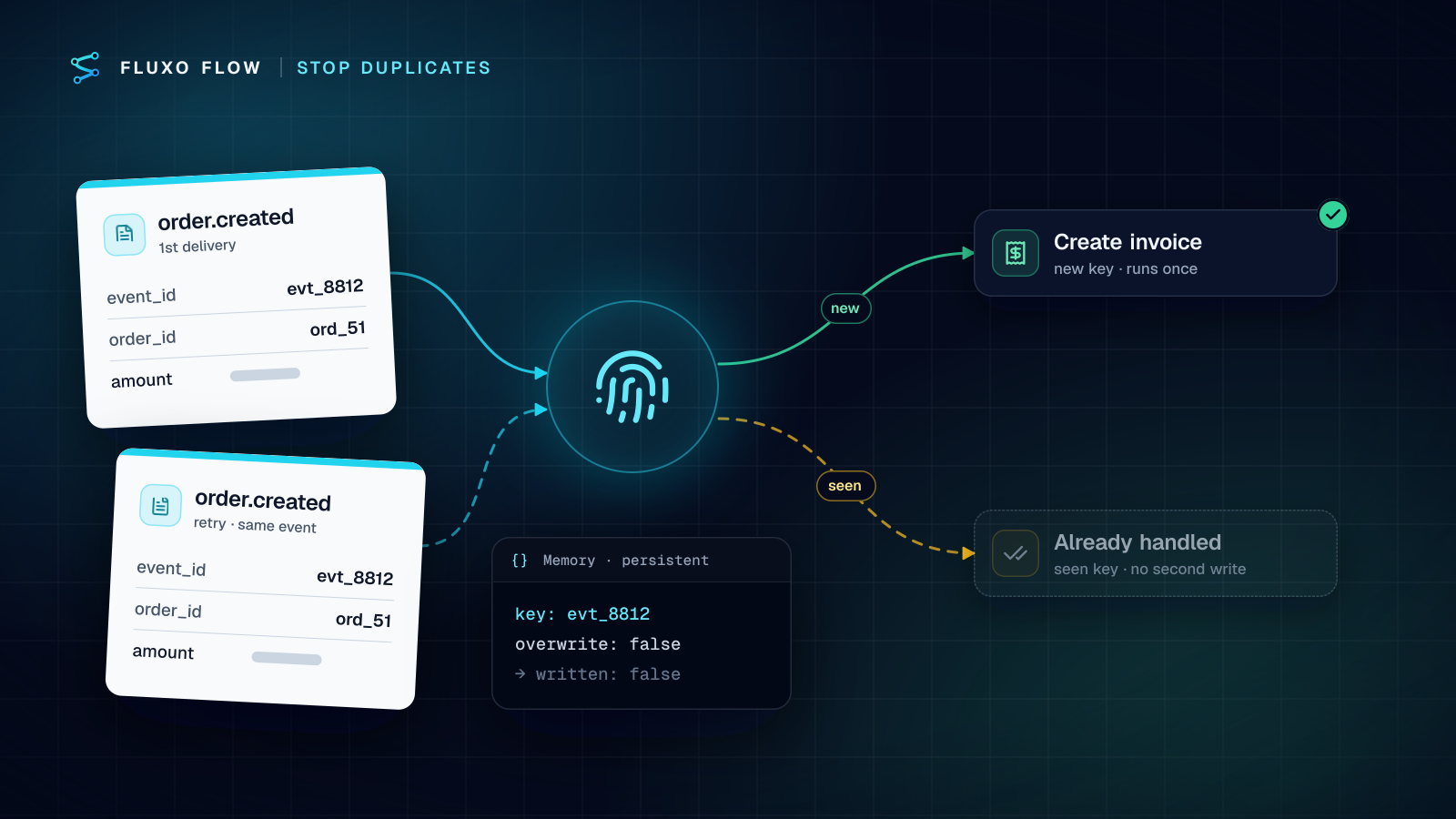
Duplicate records in automations almost never come from a bug in the step that writes them. They come from the fact that every system in the chain is allowed to deliver the same thing twice, and most workflows assume it won't happen.
Short answer: to prevent duplicate records, give every event a stable key (an idempotency key) and make every write check it. Three patterns cover nearly everything: a dedupe key stored before or after the side effect, find-or-create (or a native upsert) against the destination, and idempotency keys on the API calls that create things. Then retry only failures that are safe to retry, with backoff, at one layer, and route everything else to an Error Handler that leaves a clear trail.
Why duplicates happen: at-least-once delivery
Webhook senders, queues and polling triggers are built to deliver at least once. If they don't hear a success in time, they send again. Stripe is typical: it retries failed deliveries for up to three days in live mode and warns that endpoints "might occasionally receive the same event more than once" (checked October 4, 2026).
Delivery is only one source. Here are the failure modes I see most, and what fixes each.
| Scenario | What actually happens | Pattern that fixes it |
|---|---|---|
| Sender retries a webhook | Your workflow answered slowly or errored; the same event arrives again | Dedupe on the event id at the door |
| Timeout after write | The CRM created the record, but the response never came back; your step retries and creates a second one | Idempotency key, or find-or-create |
| Partial run | Steps 1–3 succeeded, step 4 failed; someone re-runs the whole workflow | Every write step idempotent on its own |
| Double submit | A person clicks Submit twice on a form | Natural key (email, order id) plus find-or-create |
| Stacked retries | The step retries, the sender retries, and an Error Handler retries once more | Retry at one layer only |
| Manual replay | You re-run yesterday's failed events to recover | Keys that outlive the replay window |
The "timeout after write" row is the one that surprises people. From the workflow's point of view the call failed. From the CRM's point of view it succeeded. A naive retry turns one customer into two.
Pattern 1: a dedupe key
Pick a value that is identical across every copy of the same event and different for every real event. The provider's event id is ideal (evt_… for Stripe). Failing that, build one from business fields: invoice:{{input.invoice_id}}:paid.
At the door: the trigger's Idempotency-Key
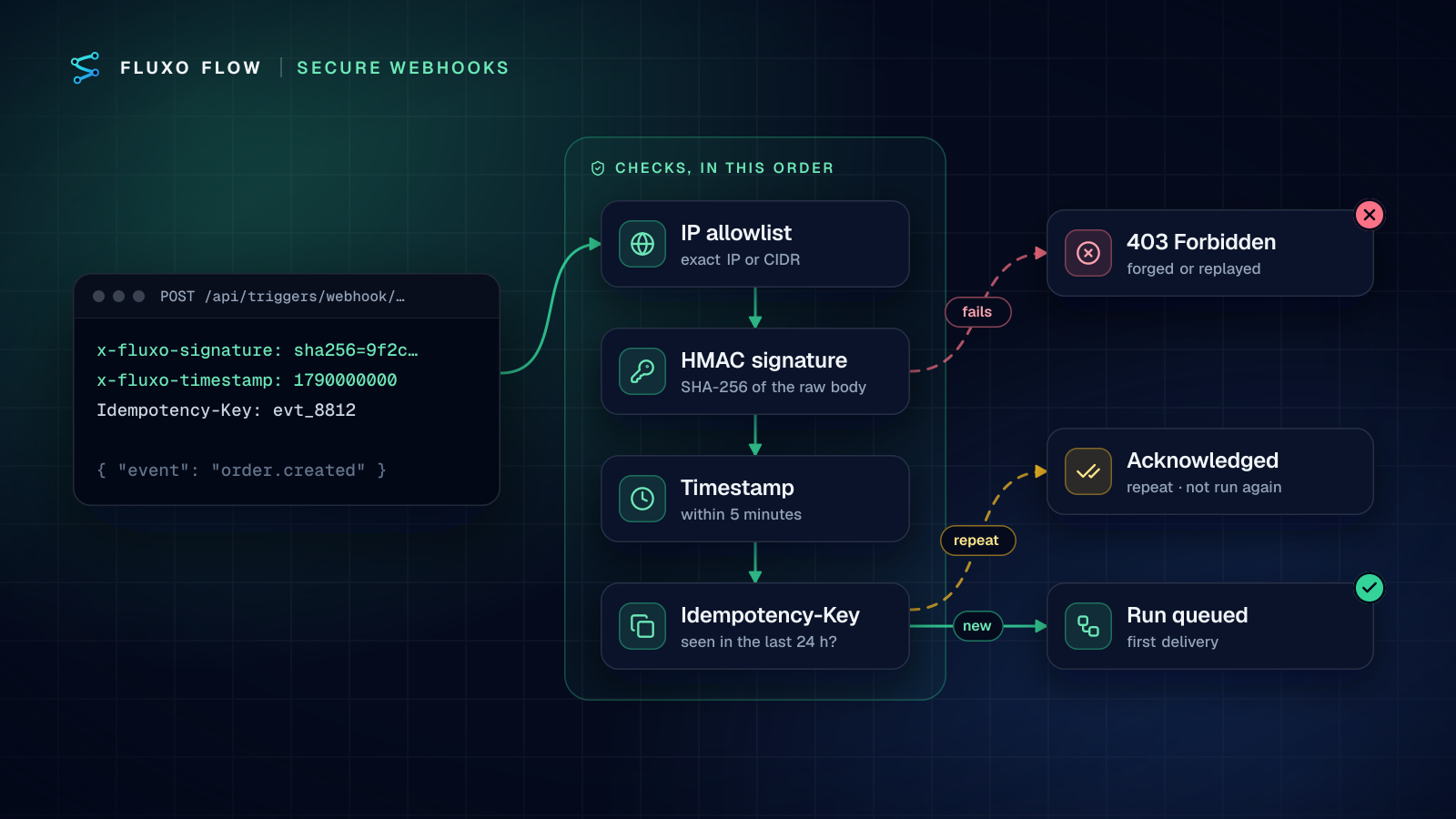
On a Fluxo Flow Webhook trigger, have the sender include an Idempotency-Key header (or x-fluxo-event-id). The first request with a key is queued; any repeat within 24 hours is acknowledged with duplicate: true and never starts a second run. The key is claimed with a unique insert, so two copies arriving in the same instant can't both get through. If queuing fails after the claim, the claim is released, so the sender's retry isn't wrongly treated as a duplicate.
That's the cheapest dedupe you'll ever add: zero steps, and it stops sender retries before any work starts. Its limit is the 24-hour window, which is shorter than some providers' retry periods.
Inside the workflow: a persistent Memory step
For longer windows, or for events that don't come through a webhook, add a Memory step:
- Operation write, namespace e.g.
processed-invoices, key{{input.event_id}}. Memory values persist across runs by default. - Untick Allow overwrite. If the key already exists, the step returns
written: falseandreason: "exists". - Set TTL (seconds) to cover the sender's full retry period plus a margin (three days of retries means at least four days of keys).
- Put a Router after it:
written = falsegoes to a "skip" branch that ends quietly; everything else continues.
Two honest caveats. First, this is a check-then-write, so two copies that arrive at the same moment could both pass; that's why the trigger-level key is the first line of defense and Memory is the second. Second, you have to decide when to claim the key:
- Claim before the side effect and a failure later in the run leaves the key claimed, so a legitimate retry is skipped. Fix it by deleting the key on the failure path (a Memory delete step after an Error Handler).
- Claim after the side effect and a crash between the write and the claim lets a retry write again. Fix it by making the write itself idempotent (patterns 2 and 3).
For anything involving money, I claim first and delete on failure: a skipped retry shows up as a failed run you can see and replay, while a duplicate payment shows up in a customer's inbox.
Pattern 2: find-or-create (or upsert)
The destination system already knows what exists. Ask it before you write.
Several connectors do this in one step. HubSpot's Create or update a contact matches on email, and Salesforce's Create or update a record matches on an external ID field you choose, so re-running them updates instead of duplicating (HubSpot and Salesforce are both live connectors). Where only "create" exists, put a find in front: HubSpot Find records, Google Sheets Find a row, Stripe Find a customer by email (beta), QuickBooks Online Find a customer (beta), Xero Find a contact (beta). Route on whether the find returned an id.
Match on something stable. Email is good for people. For orders, invoices and tickets, store the source system's id in a custom field on the record (an "External ID" or "Source event" property) and search on that. Names and free text are not keys: "Acme Inc" and "ACME, Inc." are the same customer to a person and two customers to a database.
Find-or-create has the same race as Memory (two runs can both find nothing), so it pairs well with the trigger-level key.
Pattern 3: idempotency keys on API calls
Some APIs let you send the key, and then the timeout-after-write problem disappears. Stripe's idempotent requests save the status code and body of the first request for a key, "regardless of whether it succeeds or fails", return that same result for repeats, compare parameters and error if they differ, and may prune keys once they're 24 hours old. Keys can be up to 255 characters, and Stripe suggests random V4 UUIDs or similar high-entropy strings (checked October 4, 2026).
In Fluxo Flow you'll meet the same idea in two places:
- Starting runs through the REST API. Send
Idempotency-KeywithPOSTto start a run. For 24 hours, a retry with the same key and body returns the original run withIdempotent-Replayed: true. The same key with a different body gets409 idempotency_conflict; a retry while the first request is still processing gets409 idempotency_in_progress. Details are in the API docs. - Sending data out of a workflow. A Publish Output step that posts to a webhook or HTTP endpoint has an Idempotency Key field. Left empty it's unique per run, which protects retries within a run. Template it from the business event (
order-{{input.order_id}}) and it also protects re-runs.
Which key to use is a real decision. A random UUID per operation is right when you generate the key once and reuse it on retries of that call. A key derived from business data is right when the same logical event might be re-run from scratch, because a fresh random key would look like a new request.
Retries and backoff: when to retry, and when not to
Retries fix transient failures and create duplicates out of non-transient ones (the glossary entry on exponential backoff covers the timing). The rule is simple: retry only when repeating the request can't change the outcome.
RFC 9110 defines idempotent methods: GET, HEAD, PUT, DELETE, OPTIONS and TRACE are idempotent; POST is not. A retried GET is harmless. A retried POST that creates something is only safe with an idempotency key or a prior check.
Marc Brooker's piece in the Amazon Builders' Library, Timeouts, retries and backoff with jitter, is the best short treatment I know. Two points from it apply directly to workflows. Retries are "selfish": they spend the other system's capacity to raise your odds. And retries multiply across layers; his example of five layers each retrying three times means 3⁵ = 243 times the load on the bottom layer. Retry at one layer, cap the backoff, and add jitter where you control the client.
What that means on the canvas:
- Action and HTTP Request steps have Retries (default 2), Retry Strategy (exponential, fixed or none) and Max Retry Delay (default 30 seconds). The step's own tip is right: retry timeouts, 429s and provider outages, not 400s.
- Don't stack layers. If the step retries twice, the sender retries for days, and an Error Handler in retry-once mode adds a third layer, one bad minute can turn into a burst.
- Mind the clock. A server run has a time limit of about 50 seconds, and backoff waits count toward it. Three retries with long delays can time out the whole run, which looks like a failure even when the last attempt would have worked.
Error Handler designs
Connect a step's error edge to an Error Handler and choose a mode: log, retry-once, fallback (continue with a fallback value) or rethrow (propagate, so the next step should be a notification, not business logic). Three designs cover most workflows:
- Compensate and notify. The write failed after you claimed the dedupe key: delete the key, post the event id and error to a Slack channel, end the run as failed. A later retry starts clean.
- Fallback for optional work. An enrichment lookup timed out: continue with an empty value and a flag, so the core record still gets created once.
- Stop loudly. Anything touching money or customer messages: rethrow, notify, and let a person replay it from the run history after checking the destination.
Whatever the design, a partial run should never need a full re-run to finish. If it does, every write before the failure point has to survive being repeated.
Test it: Dry Run, then one live replay
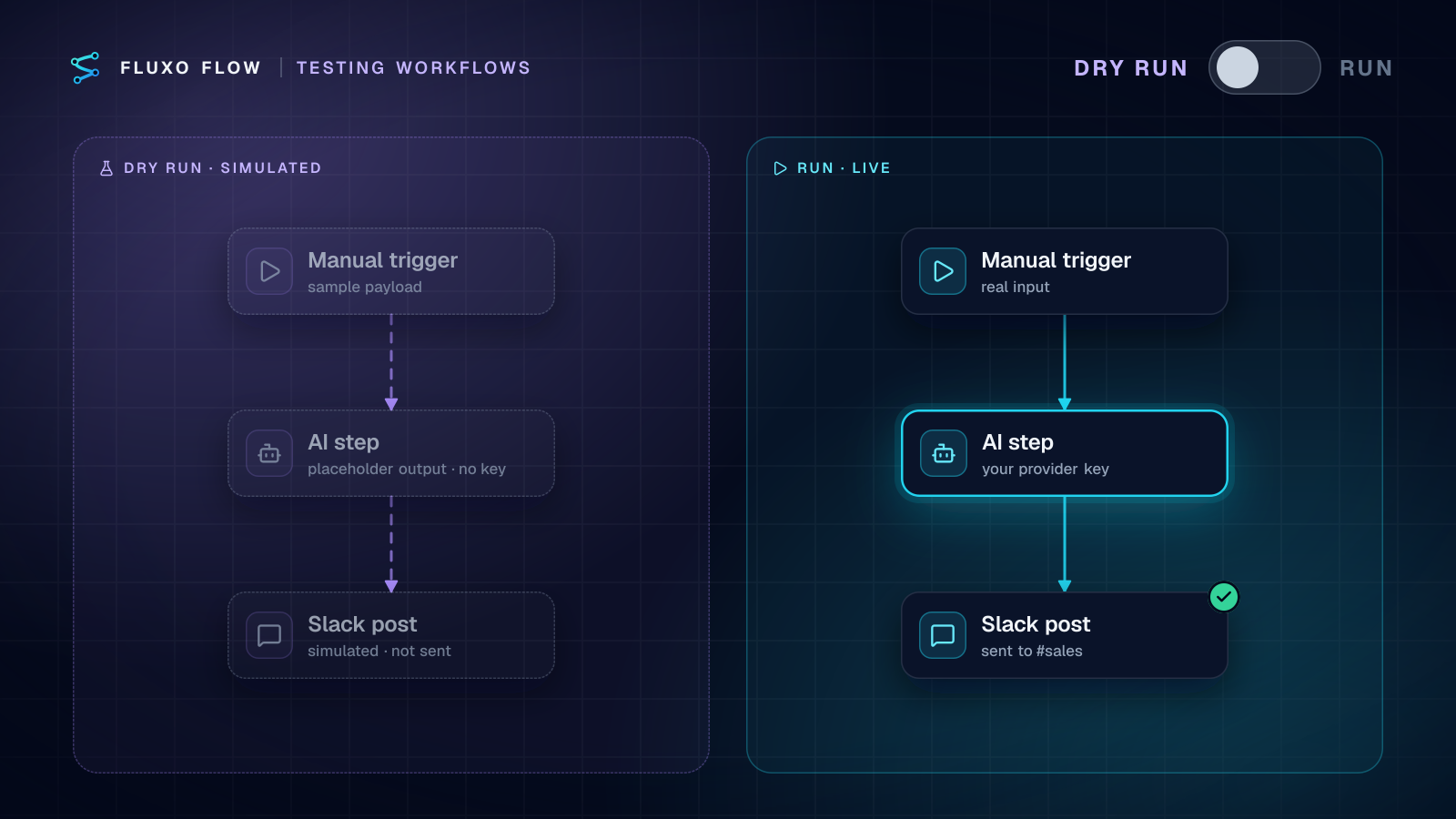
Dry Run proves the wiring: the skip branch exists, the Router reads the right field, the Error Handler path ends somewhere sensible. It can't prove the dedupe itself, because Dry Run simulates the Memory step and every external call.
So finish with a live replay against safe destinations (a test channel, a sandbox CRM): send the same event twice, then once more with a different event id. You want one record, one acknowledged duplicate, and a second record for the new id. Then force a failure (point a step at a bad URL) and confirm the compensation path cleans up and the retry succeeds. Ten minutes of this is cheaper than one afternoon of merging duplicate contacts.
The AI enrichment webhook relay template is a good place to practice: it already forwards with retries and an idempotency key. Add a persistent Memory step on the event id before the AI step, and you've stopped paying for duplicate AI calls as well as duplicate records. For locking down the inbound side of the same workflow, see how to secure webhooks; for finance flows where a duplicate costs real money, see Stripe to QuickBooks or Xero.
Frequently asked questions
What is an idempotency key?
A unique value the caller attaches to a request so the receiver can recognize retries of the same operation. The first request with a key does the work; repeats with the same key return the original result instead of doing it again.
What does at-least-once delivery mean?
The sender guarantees every event arrives, but not that it arrives only once. If it doesn't get a timely success response it sends the event again, so receivers must be able to handle duplicates safely.
Should an automation retry on every error?
No. Retry timeouts, 429 rate limits and temporary 5xx errors. Don't retry 4xx validation errors (the same request will fail again), and don't retry a write that isn't idempotent unless it carries an idempotency key or you've checked it didn't already happen.
How long should I keep deduplication keys?
At least as long as the sender keeps retrying, plus a margin. If a provider retries for up to three days, a 24-hour key window won't catch a late retry; set the key's expiry to cover the full retry period.
Put this into practice
Build it on the canvas and Dry Run it on the Free plan, with no credit card. Run it live on a paid plan, on your own AI key.
- reliability
- idempotency
- workflow design
- testing