Guides
Zapier pricing explained: how tasks add up (with worked examples)
Zapier pricing explained with real math: what counts as a task, why AI steps and loops multiply them, three worked examples and when Zapier costs less.
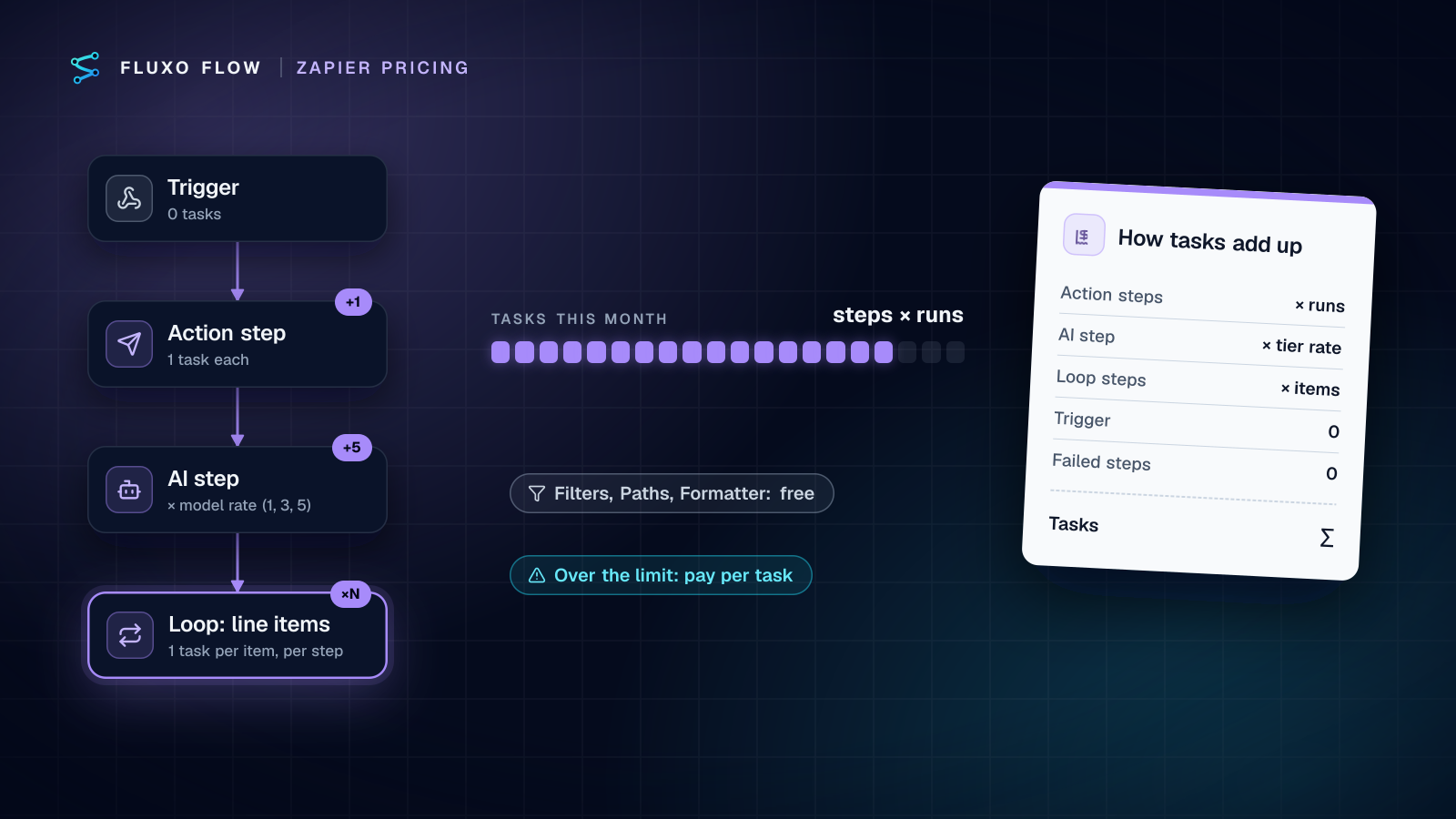
Short answer: Zapier charges by tasks. A task is one successful action step in one run, so your monthly tasks are roughly action steps × runs. Triggers, Filters, Paths and failed steps are free. Two things make bills jump: AI by Zapier steps, which count 1, 3 or 5 tasks per run depending on the model tier, and loops, where every step after the loop counts once per item. Paid plans start at $19.99/month billed annually for 750 tasks (Zapier pricing, checked October 4, 2026).
That's the rule. The rest of this guide is the math: three workflows priced line by line, the multipliers people miss, a fair look at when Zapier is the cheapest option, and a checklist to run before you accept the next tier.
We make Fluxo Flow, which prices differently (by workflows and seats, not tasks), so read the comparison sections with that in mind. Every Zapier figure below comes from Zapier's own pricing page and help center, with links, checked on October 4, 2026.
What counts as a Zapier task (and what doesn't)
Zapier's help center lists the rules plainly (How is task usage measured):
| Counts as tasks | Doesn't count |
|---|---|
| Every successful action step, 1 task per run | Trigger steps and polling for new data |
| Steps inside an error handler path | Filter and Paths steps |
| Replays of previously successful steps | Steps that error or halt |
| Each action in a Sub-Zap, plus its Call and Return steps | Formatter, Delay, Looping, Digest and Storage |
| AI by Zapier (by model tier), Code by Zapier (1+), Lead Router (5 per lead), Zapier MCP (2 per tool call) | Zapier Tables and Forms steps; Zapier Agents usage |
Two consequences matter more than the table itself.
First, cleanup steps are free, real work isn't. Reformatting a date with Formatter costs nothing; writing that date to a spreadsheet costs a task. A Zap with ten steps where six are Filters and Formatters may cost less than a four-step Zap that writes to four apps.
Second, a Zap's cost is set by its busiest path, times its run count. Volume is the multiplier you control least. A workflow that's cheap at 300 runs a month becomes your largest line item at 3,000.
Zapier pricing tiers in one paragraph
The Free plan includes 100 tasks a month and only two-step Zaps (a trigger plus one action). Professional starts at $19.99/month billed annually or $29.99 billed monthly for 750 tasks; Team starts at $69/month annually or $103.50 monthly for 2,000 tasks and 25 seats. Each plan has a slider of task tiers, and you pay for the tier that covers your month (Zapier pricing, checked October 4, 2026). If you go over, pay-per-task billing (when enabled) keeps Zaps running and bills the extra at 1.25× the plan's per-task rate on annual plans or 2.5× on monthly plans, per the same page.
The worked examples below use the Professional tiers and show both billing options.
Three worked examples
Example 1: form to Slack (one action)
A website form posts a lead; the Zap sends it to a Slack channel. One action step.
- Tasks per run: 1
- Runs per month: 1,000
- Tasks per month: 1,000
- Tier needed: 1,500 tasks, $58.50/month billed monthly or $39/month billed annually
This is the shape Zapier is built for, and the price is fair for it.
Example 2: lead enrichment with an AI step
Same form, more work: an AI step scores the lead, then the Zap creates the CRM contact, posts to Slack, adds a row to a sheet and emails the owner. Four plain action steps plus one AI step.
Since June 15, 2026, AI by Zapier steps are priced by model tier: Standard counts 1 task per run, Advanced 3, Premium 5, and Premium is the default for new steps. Each tool call the step makes adds the same rate again (AI by Zapier model tier pricing, checked October 4, 2026).
| AI on Premium (default) | AI on Standard | |
|---|---|---|
| Plain action steps | 4 tasks | 4 tasks |
| AI step | 5 tasks | 1 task |
| Tasks per run | 9 | 5 |
| Tasks per month at 1,000 runs | 9,000 | 5,000 |
| Tier needed | 10,000 | 5,000 |
| Price, billed monthly | $193.50 | $133.50 |
| Price, billed annually | $129 | $89 |
Nothing about the workflow changed between the two columns except a dropdown. If you add an AI step and leave the default tier, check your next invoice. For scoring a lead from form fields, Standard is usually enough; save Premium for steps that actually call tools.
Example 3: an order with line items (a loop)
Each new order creates an invoice in your accounting tool (one action before the loop), then loops over the line items and, for each one, adds an invoice line and updates an inventory row (two actions after the loop).
Zapier's rule: the Looping step itself is free, an action before the loop uses 1 task, and "each action step after the loop uses 1 task for each loop that runs" (Understanding Looping by Zapier, checked October 4, 2026).
- Tasks per order: 1 + (2 × 6 items) = 13
- Orders per month: 400
- Tasks per month: 5,200
- Tier needed: 10,000 tasks, $193.50/month billed monthly or $129/month billed annually
Notice the tier. 5,200 tasks misses the 5,000 tier by 200, so a slightly bigger average basket pushes you up a full step. Loops make cost depend on your data, not just your workflow design, which is why loop-heavy Zaps are the ones that surprise people.
Why AI steps and loops multiply tasks
Both multipliers break the intuition that "one step = one task".
- AI steps multiply by model tier, and agentic steps multiply again by tool calls. A Premium step that calls two tools counts 15 tasks in one run, per Zapier's own example (5 for the step plus 5 for each tool call).
- Loops multiply by item count, and every step inside the loop gets multiplied, not just one.
- Combine them (an AI step inside a loop) and you multiply twice. Summarizing ten support emails with a Premium AI step inside a loop is 50 tasks per run before any other step.
A useful habit: for every Zap with an AI step or a loop, write its worst-case tasks per run next to its name. That single number tells you which Zap to redesign first.
Approvals count too: Human in the Loop
If you pause Zaps for approval, budget for it. Human in the Loop is available on Professional, Team and Enterprise, and "only successful Human in the Loop actions will count toward your task usage"; previews and notifications don't count separately (Zapier help, checked October 4, 2026). An approval step is therefore a normal task in the math above. It's cheap, but it isn't free.
When Zapier is the cheapest option
Be honest with yourself here, because switching costs time.
- Low volume, simple Zaps. If your month is 750 single-action tasks, Professional costs $19.99/month billed annually. Our cheapest plan that runs workflows live is Basic at $39/mo. At that volume, Zapier is the better deal.
- Niche apps. Zapier lists 9,000+ apps on its pricing page. If your process depends on a tool with no public API, a smaller platform simply can't reach it, at any price.
- Mostly cleanup logic. Filters, Paths and Formatter are free on Zapier, so a Zap that's mostly routing and reformatting with one write at the end stays cheap at volume.
- One person, a few automations. Professional is a single seat; if that's all you need and your volume is modest, staying put is rational.
How flat pricing compares
Plans priced by workflows and seats move the risk around. With Fluxo Flow pricing, nothing is metered per run, task or step: the three workflows above would fit Basic ($39/mo, up to 15 workflows) whether the order loop has 6 items or 60.
Three caveats, so the comparison stays fair:
- AI tokens are billed separately. AI steps run on your own provider key, so your provider (OpenAI, Anthropic, Google and others) bills you its token price directly. We add no markup, but it isn't free; for Example 2, add your provider's cost per lead. Our bring-your-own-key cost guide shows the per-run math.
- Runs have limits. A server run stops at 50 seconds or when its estimated AI cost reaches $2, so a huge loop belongs in smaller batches either way.
- Our catalog is far smaller. If your Zap depends on an app we don't connect to, use an HTTP Request step if the app has an API, or keep that Zap on Zapier.
To see your own numbers side by side, the cost calculator uses the same Zapier tier table as this article. For the full side-by-side (features, approvals, testing), see Fluxo Flow vs Zapier or the wider Zapier alternatives roundup, and for a model-by-model view of tasks, credits and executions, read automation pricing compared.
Checklist before you upgrade a Zapier tier
Run this before you accept the next tier. It usually takes under an hour.
- Pull task usage per Zap (Zap history can export up to 5,000 runs at a time as CSV or JSON, per Zapier help) and sort descending. In most accounts a handful of Zaps account for most of the tasks.
- Check every AI step's model tier. Move steps that don't call tools to Standard.
- Look for loops and write down average items per run. Can you filter items before the loop, or batch them into one write?
- Replace action steps that only reshape data with Formatter or Filter steps, which are free.
- Find polling-heavy, low-value Zaps whose trigger fires constantly but rarely does useful work, and add a Filter right after the trigger.
- Check replays and error paths. Replays of successful steps and error-handler steps both count.
- Price annual vs monthly for the tier you'd land on: the monthly price is about 1.5× annual on the Professional table.
- Model the alternative honestly, including AI tokens and migration time. If the numbers point to switching, our Zapier migration checklist shows how to move one workflow at a time.
The takeaway: Zapier's price is predictable once you count the way Zapier counts. Write down action steps, AI tiers and loop sizes per Zap, multiply by runs, and you'll know your next bill, and whether a different pricing model would serve you better.
Frequently asked questions
Does a Zapier trigger count as a task?
No. Zapier says trigger steps and polling for new data never use tasks; only successful action steps do (Zapier help, checked October 4, 2026).
Do failed steps or Filters use Zapier tasks?
No. Action steps that error or halt don't count, and Filter, Paths, Formatter, Delay and Looping steps are free. Steps inside an error handler path and replays of successful steps do count (Zapier help, checked October 4, 2026).
What happens when I run out of Zapier tasks?
If pay-per-task billing is on, Zapier keeps running your Zaps and bills the extra tasks; its pricing page lists the overage rate as 1.25× (annual plans) or 2.5× (monthly plans) the plan's per-task price. Otherwise you upgrade to a bigger task tier (Zapier pricing, checked October 4, 2026).
How many tasks does an AI by Zapier step use?
It depends on the model tier: Standard counts 1 task per run, Advanced 3 and Premium 5, and each tool call adds the same rate again. Bring-your-own-key steps count at 1× (Zapier help, checked October 4, 2026).
Put this into practice
Build it on the canvas and Dry Run it on the Free plan, with no credit card. Run it live on a paid plan, on your own AI key.
- Zapier
- pricing
- automation costs
- comparison