Guides
How to white-label workflow automation for clients, and what it really costs
White label automation for agencies: the four ways to offer it under your brand, licensing traps (n8n, Zapier), real vendor prices and a margin worksheet.
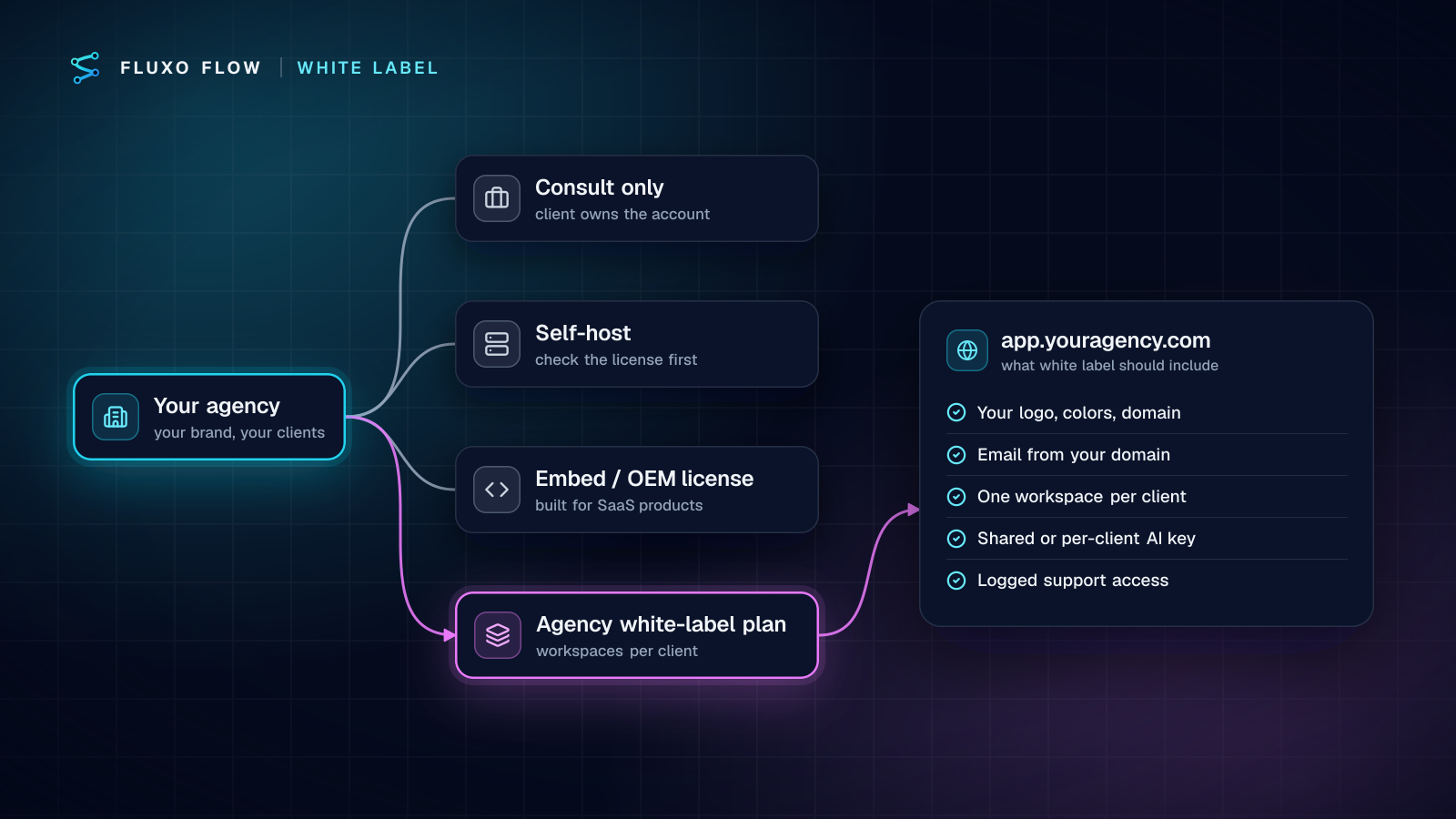
Short answer: there are four ways to offer workflow automation under your own brand. You can consult on accounts your clients own (no platform cost to you, but no brand either), self-host an open-source tool (check the license: n8n's doesn't allow it for client hosting without an Enterprise license), buy an embed/OEM license (from $3,000/month at Albato or $36,000/year at Activepieces, built for SaaS products), or use an agency white-label plan (published from $79/month at TaskJuice to $699/month for our Partner plan). Which one is "cheapest" depends less on the sticker price than on how many clients you run and how much of your time each route eats.
The vendor posts that rank for this topic each show one product. Below is the whole map: the four routes, the licensing traps with the vendors' own words, a checklist for what "white label" should actually include, and a margin worksheet that's honest about when a white-label plan pays off and when it doesn't. We sell one of the options (the Fluxo Flow Partner plan), and we'll say where others fit better. All third-party prices were checked on October 4, 2026.
The four ways to offer automation under your brand
| Route | What you sell | Platform cost to you | Your brand on the app? | Best for |
|---|---|---|---|---|
| 1. Consult on client-owned accounts | Build and care hours | None; the client pays the vendor | No | Freelancers starting out, clients who want to own everything |
| 2. Self-host an open-source tool | A managed service on your servers | Servers, plus a commercial license if the tool's license requires one | Depends on the license | Technical teams with ops capacity |
| 3. Embed / OEM license | Integrations inside your own software product | From thousands per month | Yes, inside your product | SaaS companies, not service agencies |
| 4. Agency white-label plan | A branded automation app plus your service | A monthly plan, often per client workspace | Yes | Agencies and consultants with several clients |
Route 1: consult on client-owned accounts
You build inside each client's Zapier, Make or n8n account; the client pays the vendor directly. It's the lowest-risk start and licensing is simple. n8n, for example, says helping clients set up their own internal instances needs no commercial license on your part (n8n support).
The trade-offs: the client sees the vendor's brand, you juggle many logins, and your service is easy to replace with "someone cheaper who knows Zapier".
Route 2: self-host an open-source tool
This is where most agencies hit a licensing wall.
- n8n is source-available under the Sustainable Use License, which permits use "only for your own internal business purposes or for non-commercial or personal use" (license). Its support article is explicit: "If you intend to host and manage your clients' workflows and credentials within your own internal n8n instance, an Enterprise license would be required", and white-labeled embedding needs an Embed license (n8n support).
- Activepieces publishes its community edition under the MIT license, with enterprise folders under a separate license (license file). MIT is permissive, so check which features you need live in the enterprise folders.
Self-hosting also makes you the hosting company: uptime, upgrades, backups, security patches and incident response are now in your contract with the client.
Route 3: embed / OEM licenses
These are built for software companies that want an integration builder inside their own product. Published prices: Albato Embedded Starter at $3,000/month (no white-labeling) and Pro at $5,000/month with full white-labeling (Albato); Activepieces Embed "starting at $36,000/year" (Activepieces pricing); n8n Embed through sales. If you're a service agency, this is usually the wrong product class rather than an expensive version of the right one.
Route 4: agency white-label plans
These give each client a branded workspace you manage. Published examples:
- TaskJuice: Starter $79/month billed annually with white-label branding and 3 workspaces; Growth $199 adds a custom domain and 10 workspaces; Scale $399 adds white-label emails and client billing (TaskJuice pricing).
- GoHighLevel: a CRM and marketing suite rather than a general automation canvas; custom domains from Starter at $97/month and SaaS Mode from Unlimited at $297/month (GoHighLevel pricing).
- Fluxo Flow Partner: $699/month (or $6,990/year) with 5 client workspaces at Pro limits included, extra client workspaces at wholesale prices, a custom domain, branded email and a partner dashboard. A person reviews every application.
- Zapier: no white-label or reseller plan is listed on its pricing page (Zapier pricing).
If you have one to three clients and mostly need your logo on the app, TaskJuice's Starter tier is far cheaper than our Partner plan. Be honest about your client count before you compare.
Licensing traps to check before you sign
- "Internal use" clauses. Source-available licenses often allow free use only inside your own business. Running client workflows on your server is usually not "internal".
- Credentials custody. Holding clients' OAuth tokens and API keys in your instance is exactly what n8n's FAQ singles out. It's also a contract and security question, whatever the tool.
- Branding removal. Some plans allow your logo but keep the vendor's name in emails, login pages or URLs. Ask for screenshots of the client's sign-in page and notification emails.
- Exit terms. What happens to your clients' workflows if you stop paying? On our Partner plan, clients get 30 days to export their workflows and data or move to a direct plan, with workspaces read-only meanwhile.
What "white label" should include: a checklist
Use this list in every vendor demo:
- Your domain for the app (app.youragency.com), with HTTPS handled for you.
- Email from your domain, with DKIM and SPF records you control, so notifications don't come from the vendor.
- Your logo, colors, favicon, support and docs links. No vendor pricing visible to clients.
- One isolated workspace per client, with its own members, credentials and run history.
- AI keys your way: one shared key across clients, or each client's own key, with no markup on usage.
- Support access with consent: time-limited, logged, and something the client can switch off.
- Billing you control: you invoice clients at your own prices.
- A partner dashboard showing client health and failed runs without opening each workspace.
- An exit path for clients if the relationship ends.
Our Partner plan was designed against this list: support access is read-only for 1 hour, recorded in the client's activity log, and the client can turn it off. Our guide to running automations for many clients covers the day-to-day hygiene.
Cost and margin worksheet
The platform is rarely where the margin is. Here's why, using our own wholesale prices (from our pricing code, not estimates).
How the Partner plan bills. $699/month includes 5 client workspaces at up to Pro limits. Extra workspaces cost $31 (Basic), $95 (Pro), $189 (Business) or $411 (Elite) per month. Included slots only cover Basic and Pro levels, so Business and Elite clients are always billed as extras.
Worked example. An agency with 5 clients on Pro limits and 3 on Business limits pays $699 + 3 × $189 = $1,266/month, about $158 per client.
Partner cost vs direct plans at different sizes:
| Clients | Partner plan total / month | Per client | Same clients on direct plans |
|---|---|---|---|
| 5 (5 Pro) | $699 | $140 | $595 |
| 10 (10 Pro) | $1,174 | $117 | $1,190 |
| 20 (20 Pro) | $2,124 | $106 | $2,380 |
| 8 (5 Pro + 3 Business) | $1,266 | $158 | $1,306 |
| 15 (10 Pro + 5 Business) | $2,119 | $141 | $2,375 |
Read that table honestly: at five clients, the Partner plan costs more than putting each client on a direct Pro plan ($119/mo). Around ten Pro-level clients it's roughly even, and past that the wholesale price is lower. So the case for a white-label plan at small scale isn't software arbitrage; it's your brand on the app, one dashboard for every client, and keeping clients tied to your service rather than to a vendor account.
Your margin, then, is the service. Fill this in per client:
- Monthly fee you charge the client: build amortization + care retainer.
- Minus platform cost per client (the "per client" column above).
- Minus AI usage, only if you run clients on your shared key. With per-client keys, the client's AI provider bills the client directly.
- Minus your hours per month on monitoring, changes and support, at your internal cost rate.
If line 4 is bigger than line 1 minus line 2, no platform choice will save the account. Our guide to pricing automation services covers how to set lines 1 and 4.
Operational load by route
| Route | Who runs hosting | Who holds credentials | Effort per new client |
|---|---|---|---|
| Consult only | The vendor | The client | High: new account, new logins each time |
| Self-host | You | You | Medium to high: tenants, backups, upgrades |
| Embed license | You (inside your product) | Your product | High upfront, low after |
| Agency white-label plan | The vendor | Each client workspace | Low: create a workspace, invite the client |
How the Fluxo Flow Partner plan fits
Factually: it's an agency plan (route 4) for agencies, automation consultants and MSPs. You get a white-labeled app on your own domain, branded email, a partner dashboard, a workspace per client at a level you choose, shared or per-client AI keys with no markup, and logged, time-limited support access. AI steps run on bring-your-own keys, so there are no AI credits to resell. We review every application, there's no long contract, and annual billing is $6,990/year. For how agencies use it day to day, see AI automation agency software, and for the other vendors side by side, the white-label platforms comparison.
It's not the cheapest white-label option at small scale, and it's not an embed SDK for your own software. It suits agencies that want to run several clients' AI workflows, with approvals, under their own brand.
The takeaway: decide your route by client count and appetite for operations, not by headline price. If you have a handful of clients, consult on their accounts or start on a low-cost white-label tier. If you're heading past ten clients and want one branded place to run them all, compare agency white-label plans on the checklist above, then run the margin worksheet with your real numbers.
Frequently asked questions
Can you white-label Zapier?
Zapier doesn't list a white-label or agency reseller plan on its pricing page (Zapier pricing, checked October 4, 2026). Agencies typically build Zaps inside each client's own Zapier account and bill for the service.
Can you white-label n8n?
Not under the free license. n8n's support article says hosting and managing your clients' workflows and credentials in your own instance needs an Enterprise license, and embedding n8n white-labeled needs an Embed license. Helping clients set up their own instances needs no commercial license (n8n support, checked October 4, 2026).
How much does white-label automation cost?
Published prices range from $79/month billed annually (TaskJuice Starter) through agency plans like Fluxo Flow Partner at $699/month, to embed licenses from $3,000/month (Albato Embedded) or $36,000/year (Activepieces Embed), checked October 4, 2026. Your own time is usually the larger cost.
Do clients see the vendor's name on a white-label plan?
It depends on the vendor. On Fluxo Flow's Partner plan, clients see your name, logo, colors, domain and email sender, and never see Fluxo Flow pricing or billing; a "Powered by" note is optional.
Put this into practice
Build it on the canvas and Dry Run it on the Free plan, with no credit card. Run it live on a paid plan, on your own AI key.
- white label
- agencies
- pricing
- n8n
- Zapier