Comparisons
Zapier vs Make vs n8n vs Fluxo Flow: how to choose
A fair, practical way to choose between Zapier, Make, n8n and Fluxo Flow: what each is best at, how they price, and the questions that decide it for your team.
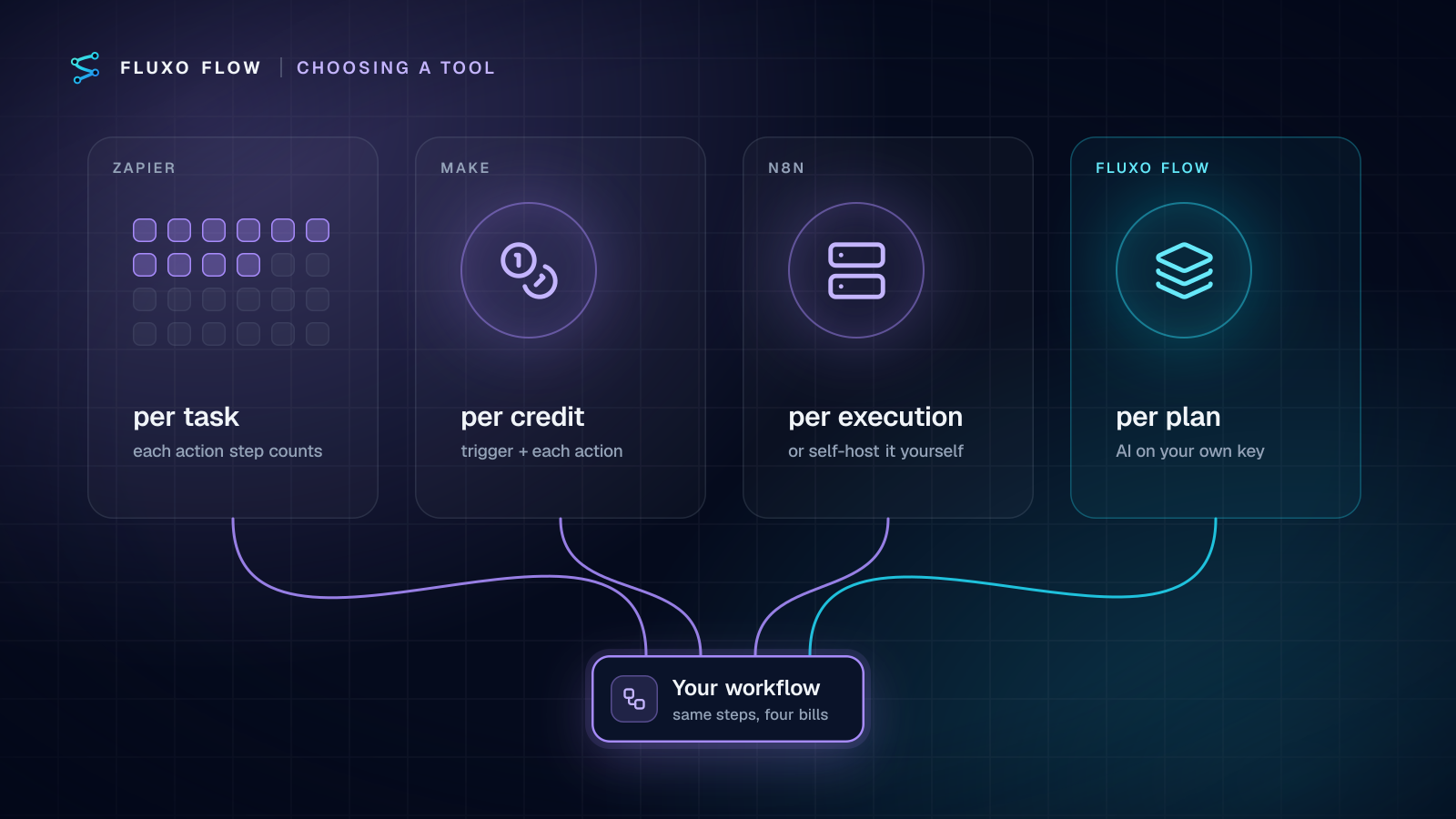
If you're choosing a workflow automation tool, you've probably narrowed it down to some mix of Zapier, Make and n8n, and maybe you've found Fluxo Flow along the way. All four connect apps and run workflows. They're built for different people and priced in different ways, and the right choice depends far more on your situation than on any feature checklist.
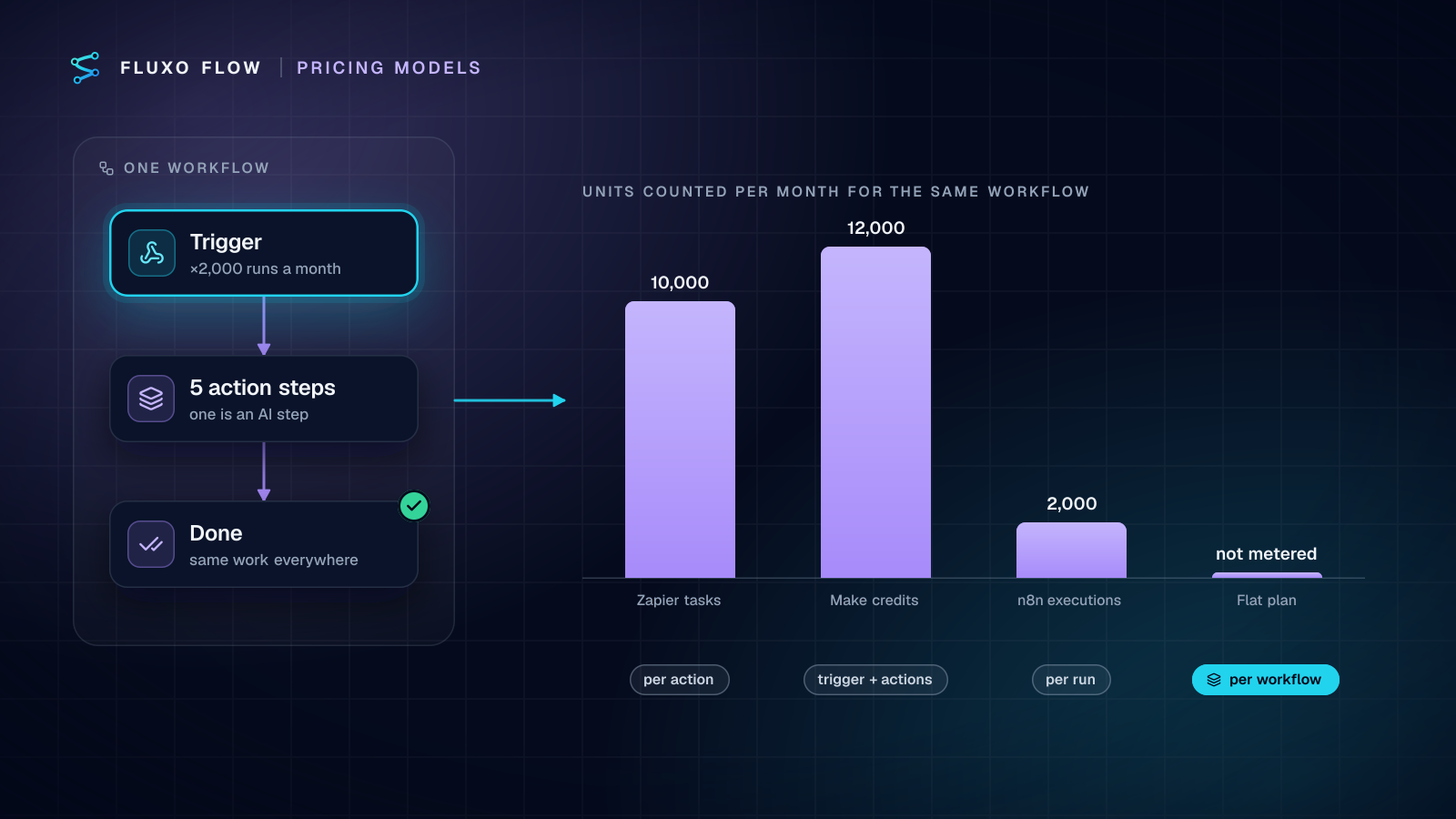
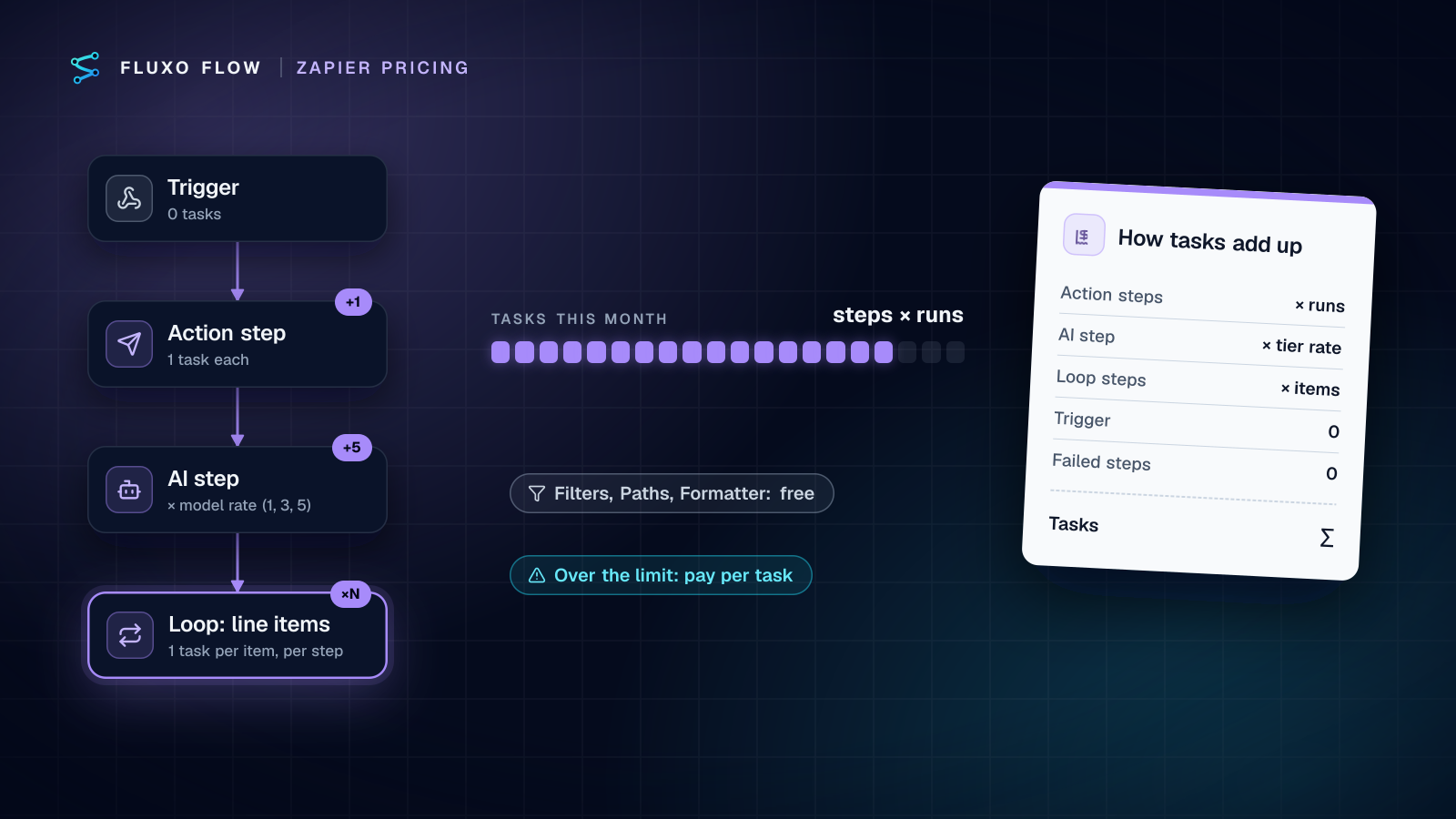
Short answer: pick Zapier for the widest app catalog and the simplest editor, Make for visual, data-heavy scenarios at low cost per step, n8n if you have engineers and want to self-host, and Fluxo Flow if AI runs through most of your workflows and you want approvals and testing built in. Pricing units differ (Zapier counts tasks, Make credits, n8n Cloud executions; Fluxo Flow prices plans by workflows and seats), so model your own volume before deciding.
We make Fluxo Flow, so we're not neutral. What we've tried to do here is be useful: say plainly where each tool is strong, including where the others are a better fit than we are. Vendor facts were checked on October 4, 2026. For detailed, dated feature and pricing tables with sources, see our individual comparisons: Fluxo Flow vs Zapier, vs Make and vs n8n.
The short version
- Zapier is the easiest way to connect two popular apps, with the largest catalog of ready-made integrations.
- Make is a visual scenario builder with strong data mapping and transformation, for people who like to see the flow and shape the data.
- n8n is a developer-friendly tool you can self-host, with code steps and a source-available license, plus a hosted cloud option.
- Fluxo Flow is a visual canvas built around AI steps on your own AI key with no markup, human approval steps and a Dry Run mode for testing without side effects.
Zapier: breadth and simplicity
Zapier's biggest strength is its app directory. If you need to connect two well-known SaaS tools, there's a very good chance Zapier already has both, with triggers and actions ready to use. Its editor is a linear sequence of steps, which is easy for non-technical teammates to follow, and it has added branching, AI features and more advanced building blocks over time.
Choose Zapier when your workflows are mostly "when X happens in app A, do Y in app B", you depend on niche apps that other tools don't support, and ease of use for non-technical colleagues matters most.
Think about how its usage-based pricing (it counts tasks) maps to your volume, and how AI usage is billed.
Make: visual and data-heavy
Make (formerly Integromat) presents workflows as scenarios on a visual canvas, with routers, iterators and aggregators for reshaping data. People who think visually and work with complex data structures tend to like it.
Choose Make when your workflows involve lots of data transformation, you want a visual builder with fine control over each module, and its credit-based pricing suits your volume.
Think about how quickly credits add up for high-volume or many-step scenarios (the trigger and most module actions each use one), and how AI steps are billed.
n8n: control and self-hosting
n8n is popular with technical teams. You can self-host it on your own infrastructure, write code in steps when the built-in nodes aren't enough, and keep data in your environment. Its license is source-available rather than traditional open source, so check the terms if you plan to embed or resell it. It also offers a hosted cloud version, priced by executions: one execution is one run of the whole workflow, however many steps it has.
Choose n8n when you have engineers who are comfortable running and maintaining it, you need self-hosting for data residency or control, or you want to write custom code inside workflows.
Think about the real cost of self-hosting: servers, upgrades, backups, monitoring and on-call time, not just the license.
Fluxo Flow: AI on your key, with people in the loop
Fluxo Flow is a hosted, visual canvas for workflows that mix AI with business logic. What's different:
- Bring your own AI key, no markup. AI steps run on your own provider account: OpenAI, Anthropic, Google Gemini and eleven more, including Azure OpenAI, AWS Bedrock and Vertex AI. Your provider bills you directly at their rates. There are no AI credits.
- Human Review is a built-in step. A run can pause until someone approves or rejects it in the Review Queue, with assignees, timeouts and bulk decisions.
- Dry Run. Test a whole workflow in your browser with every side effect simulated and no AI spend, then Run it for real.
- Run history you can compare. Every run has a step-by-step trace, and you can compare two runs side by side.
- Plans priced by workflows, seats and schedule frequency, not by individual tasks or operations, with a Free plan (build and Dry Run, no credit card) to try it before you pay.
And where we're honestly behind: our catalog of ready-made app connections is much smaller. We have ready-made connectors for 44 apps (Google, Microsoft 365, CRMs, accounting, messaging, freight, recruiting and field-service tools). Google Sheets, HubSpot, Notion, Salesforce and Slack are live; the rest are still in beta. Zapier and Make each list thousands. Anything else is reached through the HTTP Request step or the Custom API connector with credentials stored in the encrypted vault, which works with almost any API but takes more setup than a ready-made connector. We're also hosted only; there's no self-hosted edition.
Choose Fluxo Flow when AI is central to your workflows, you want to pay your AI provider directly, you need approvals built into the flow, and your key systems are covered by our integrations or have an API.
The questions that actually decide it
Feature lists blur together. These questions usually settle the choice in a few minutes.
1. Which apps must it connect to, today?
List your top five systems. If several are niche SaaS tools with no public API, a large connector catalog (Zapier, then Make) wins. If they're mainstream tools or have APIs, all four can work; check each tool's support for your exact systems.
2. How much of your work involves AI?
If AI is an occasional step, how a platform bills for it barely matters. If AI runs in most of your workflows, compare how each tool charges for model usage: bundled credits, a markup, or your own key at cost. At volume, this can matter more than the plan price.
3. Who needs to approve things?
If people need to sign off on drafted emails, payments or customer-facing changes, look for approval steps that are part of the workflow, with timeouts and an audit trail, rather than workarounds like "post to Slack and wait for a reaction."
4. Who will build and maintain it?
Non-technical operators tend to prefer Zapier or a visual canvas like Make or Fluxo Flow. Engineers often prefer n8n, especially self-hosted. Be honest about who will be on call when something breaks.
5. How does the pricing scale with your volume?
Model your real numbers (our cost calculator estimates your costs on Fluxo Flow and compares them with Zapier, Make and n8n). Per-task or per-credit pricing is great at low volume and can climb with many-step workflows at high volume. Per-workflow or per-seat pricing is more predictable at volume but may cost more for a handful of tiny automations. Our individual comparison pages link to each vendor's current pricing so you can check it yourself.
6. Where must your data live?
If you need everything inside your own infrastructure, self-hosted n8n is the natural fit. If hosted is fine, compare each vendor's security documentation, data processing terms and sub-processors.
Can you switch later?
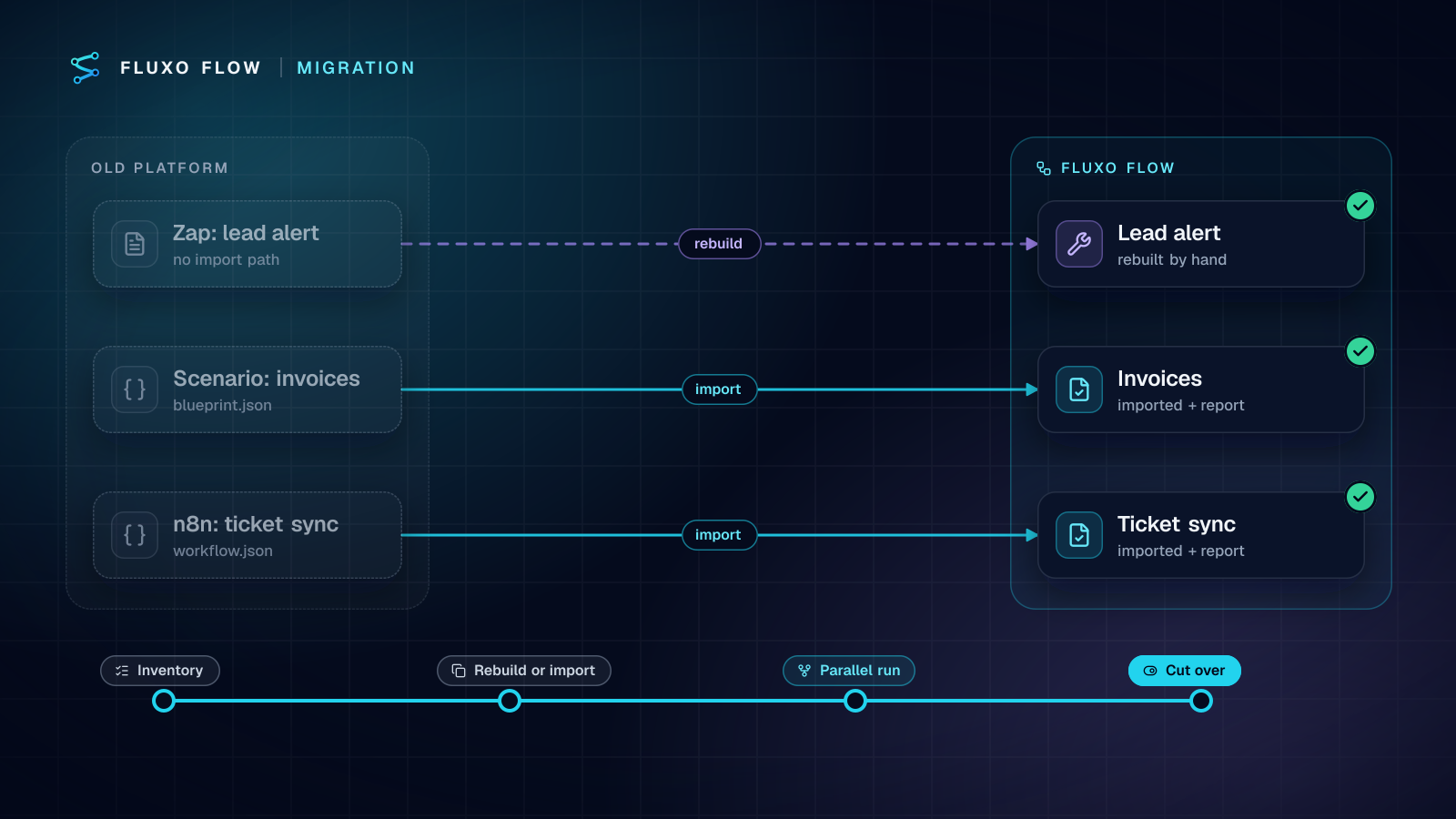
Yes, but plan for it. Workflow files don't move cleanly between most of these tools. Fluxo Flow is the exception on the receiving end: it imports n8n workflow JSON and Make blueprints, converting the common steps on a best-effort basis, so expect to reconnect credentials and check anything it couldn't map. Zapier workflows have no import path, so moving from Zapier means rebuilding. Either way it's usually less work than it sounds, because the hard part (deciding what the workflow should do) is already done. Move one workflow at a time, run old and new side by side for a week, then switch off the old one.
The takeaway
There's no single best automation tool. Zapier wins on breadth, Make on visual data shaping, n8n on control and self-hosting. Fluxo Flow is built for AI-heavy workflows where you want to pay your AI provider at cost and keep a person in the loop.
The fastest way to decide is to build your most important workflow in your top two candidates. Ours has a Free plan with no credit card where you can build and Dry Run it before paying to run it live: start free, or browse the template gallery for a starting point. If AI costs are what's driving the decision, read what bringing your own AI key costs first.
Put this into practice
Build it on the canvas and Dry Run it on the Free plan, with no credit card. Run it live on a paid plan, on your own AI key.
- comparison
- Zapier
- Make
- n8n
- choosing a tool