Guides
How to Automate Data Entry: Methods, Costs, and Tools
Automate data entry by source: Excel, QuickBooks, web forms and AS400. A method matrix, an Excel walkthrough, real cost math and checks that keep it accurate.
To automate data entry, match each source to the right method: Excel formulas and Power Query for spreadsheets, an API or app connection for QuickBooks and CRMs, webhooks for website forms, and RPA only for systems with no API, like AS400 green screens. Then add validation and a human check before anything irreversible is written.
Key takeaways
- Pick the method by how the data arrives, not by the app you type into.
- Structure spreadsheets for automation: one row per record, headers in row 1, no merged cells, dates in one format.
- Prefer an official API over browser automation or scraping whenever one exists. It is cheaper, faster and far less brittle.
- On per-task tools, count your steps before you build: the bill grows with steps × runs, not with how useful the workflow is.
- Keep entry accurate with validation at the boundary, human review on irreversible steps, and a test run on sample data before going live.
What is the source-to-method decision matrix for data entry automation?
Match the source to the method before you build anything. The right tool depends less on the software you're typing into and more on how the data arrives and whether a person needs to check it.
| Source | Best method | Why |
|---|---|---|
| Excel or CSV files | Formulas, Power Query, or a workflow triggered by a new row | Structured columns, predictable rules |
| QuickBooks or Xero | An app connection or the accounting API | Native records, clean fields, an audit trail |
| Website forms | Webhook into a workflow | Data arrives already structured |
| PDFs and email attachments | AI extraction plus a review step | Layouts vary; a person checks low-confidence fields |
| AS400 green screen | RPA or terminal scripting | No API, so the screen is the only interface |
| Excel to a web form | API call if the target has one, browser automation if not | Cross-system copy work |
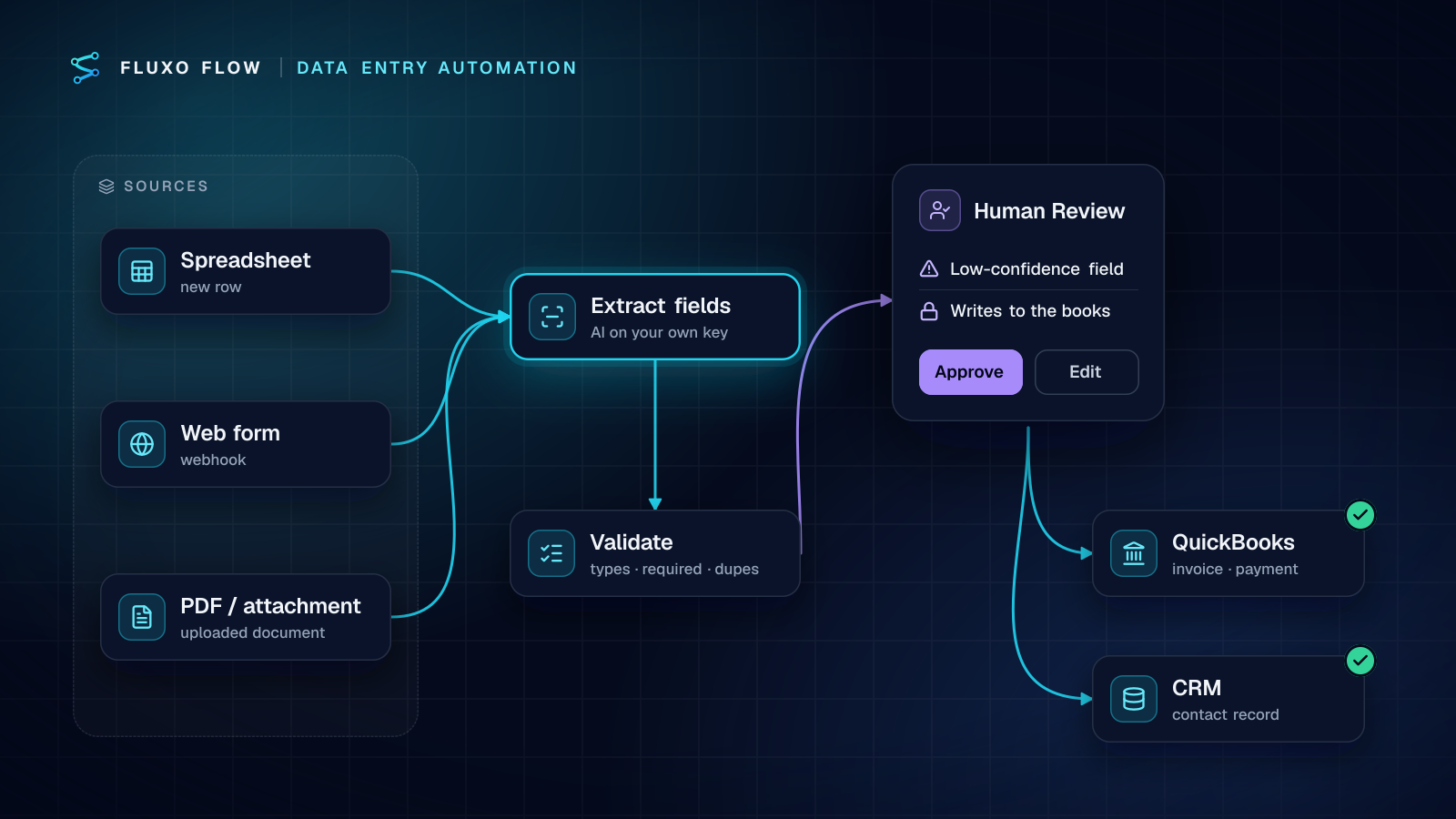
For messy inputs, add AI extraction with a review queue so a person approves anything uncertain. A document processor agent handles the extraction step: it reads the document, returns structured fields and leaves the uncertain ones for review.
How do you automate data entry in Excel step by step?
Most Excel data entry follows the same shape: something arrives (an email, a form, a CSV), someone retypes it into a sheet, and formulas or another tool act on it. Here is how to turn that into an automated flow.
Step 1: Map the manual process before automating it
Write down every manual step in order: where the data arrives, which columns you type into, which formulas run and what you do with the result. Time each step once. If the whole routine takes under two minutes a day, an automation may cost more to maintain than it saves.
Step 2: Structure the spreadsheet for automation
Automation needs a predictable sheet. Use one row per record, headers in row 1, no merged cells, and dates in a single format such as ISO 8601 (YYYY-MM-DD). Keep lookup formulas on a separate tab so the raw-data tab stays append-only. Power Query can then reshape new files the same way every time.
Step 3: Build the trigger and the flow
Pick the trigger that matches your source: a webhook for form submissions, a scheduled check for email attachments, or a "new row" trigger when another system writes to the sheet. Fluxo Flow has new-row triggers for Google Sheets and Microsoft Excel, plus webhook and schedule triggers. The flow then writes rows, runs checks and pushes the result onward.
Count your steps before you pick a tool. On Zapier, every successful action step in every run is a task, while triggers, Filters and Formatter steps don't count (Zapier help: how task usage is measured, checked November 11, 2026). A flow with five action steps that runs 200 times a day uses around 30,000 tasks a month, so check that volume against the tiers on Zapier's pricing page before you commit. Fluxo Flow prices plans by workflows and seats instead, from $39/mo, with AI billed by your own provider at cost.
Step 4: Test with sample data before going live
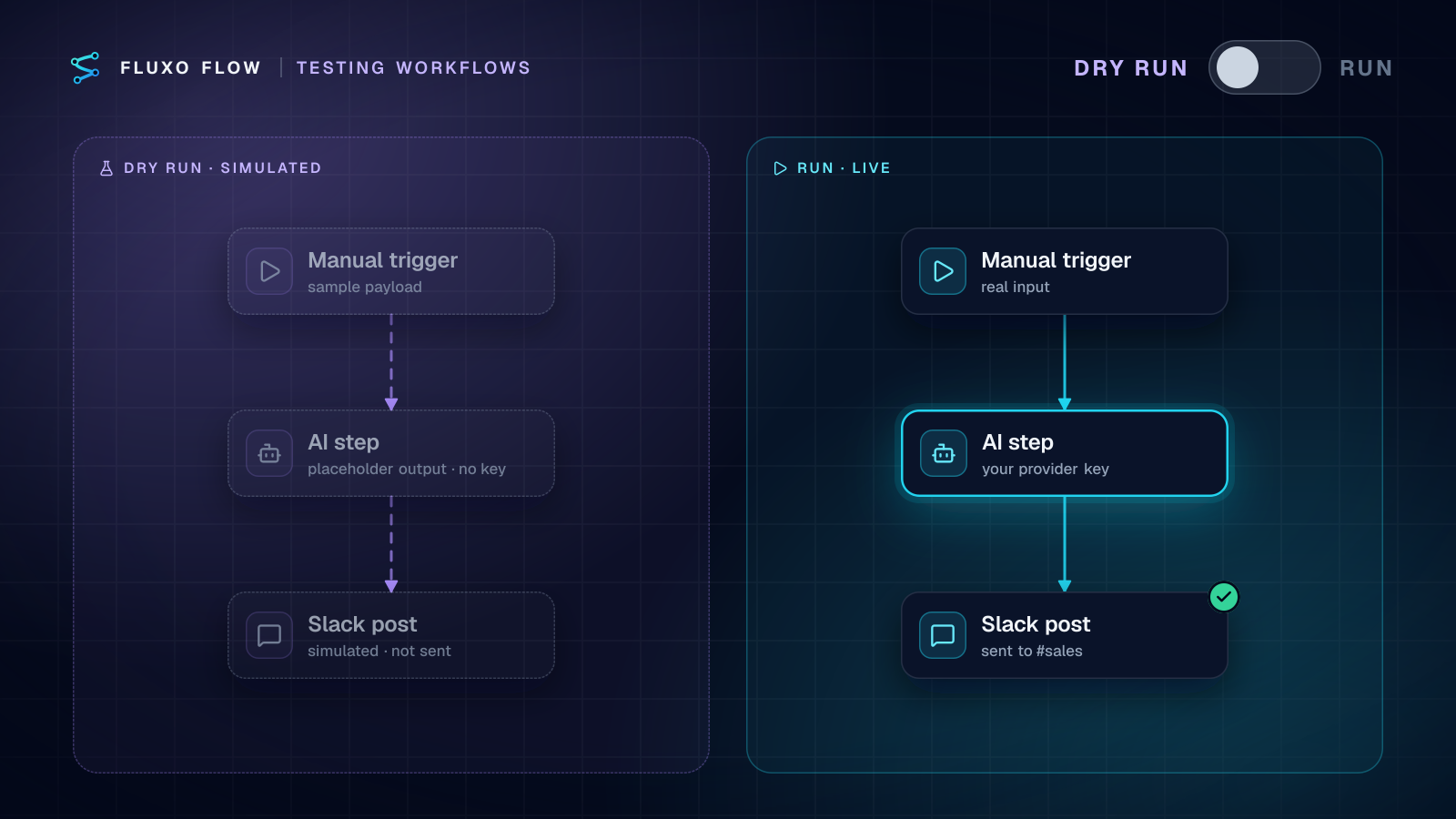
Run sample records through the flow without writing to your live sheet. Check three cases: a normal row, a row with a missing field and a duplicate. In Fluxo Flow, a Dry Run walks the whole workflow on sample data with every outside action simulated and no AI call, so testing costs nothing. Switch the flow on only after all three cases behave.
When should you automate QuickBooks data entry instead of doing it by hand?
Three signals it's time
First, volume: if you key more than 20 or 30 invoices, payments or receipts a week, manual entry is eating billable hours. Second, error cost: a mistyped amount or a miscategorized expense that surfaces at tax time costs far more than the minute you saved. Third, repetition: if the same customer, category and memo pattern shows up daily, a rule can handle it. One signal alone rarely justifies the setup; two or three together usually do.
Use the API, not screen scraping
Skip screen scraping the QuickBooks web app. Post through the QuickBooks Online API or an app connection that uses it, and route anything below your confidence threshold to a person before it posts.
In Fluxo Flow, the QuickBooks connection creates and finds customers, creates and sends invoices and estimates, and records payments. It doesn't create vendor bills today, so keep bill entry in QuickBooks' own bill capture or a dedicated accounts-payable tool. Each connected QuickBooks company (or Xero organisation) costs $6/mo on top of your plan, because both charge for API access. Put a Human Review step before any write to your books, and test the workflow with sample data first.
How do you automate data entry from Excel to a web form?
You have two paths: drive the browser like a person would, or skip the browser with an API call. API-first wins whenever the target system has an endpoint, because it is faster, cheaper per run and doesn't break when someone moves a button.
Check for an API first
Look in the web form's documentation or ask the vendor. Many CRMs, portals and freight platforms expose a REST endpoint or accept a webhook with the same fields the form collects. One POST request per row beats clicking through a page per row, and it avoids selectors that break with every redesign. If the vendor has a connector in a workflow tool, that connector uses the API under the hood.
When browser automation is the only option
Some legacy portals offer no API. Then browser automation with a tool like Playwright is the honest answer: record the flow, replay it, and have a person approve submissions before they're sent. Keep the browser step small by extracting and checking the data first in a workflow, then handing over only clean rows.
Can you automate data entry on an AS400 green-screen system?
Yes, but only through terminal emulation or RPA, because green screens have no API. The usual route is an emulator plus a script that reads screen positions and sends keystrokes, or an RPA tool that watches for specific screens. It works, but it's brittle: a layout change or a timing slip breaks the run.
Before building anything, ask whether the data can leave the system another way. Many IBM i systems can export reports or files, which turns a screen-scraping problem into a file transfer. If your volume is a few dozen records a day, manual entry may genuinely cost less than maintaining a bot.
Where Fluxo Flow fits: it can receive exported data by webhook or from a new spreadsheet row, run validation and a review step, and push clean records onward. It can't drive the green screen itself; that last mile needs RPA or a script.
What is the best way to automate data entry from websites?
Split websites into two cases.
- Structured sources (prices on a vendor portal, tracking numbers on a carrier page) suit an API or a scraper that writes the fields to your sheet. Scrapers break silently when the page changes, so add a check that fails loudly when zero rows come back.
- Unstructured sources (lead details scattered across a listing page) suit an AI step that reads the page and extracts fields into a fixed schema. That trades brittle selectors for a per-run token cost and the occasional wrong extraction, so send low-confidence results to review.
Either way, prefer an official API when one exists. It's the difference between a breakage you get emailed about and one you discover at month-end.
How do you choose between RPA, scripts and no-code workflows?
Score each option on three things: the cost model (per-task fees or flat), maintenance (every step or line is something that can break) and skills (can you fix it yourself at 11 p.m.?).
| Method | Cost model | Breaks when | Skill needed |
|---|---|---|---|
| RPA | License plus your time | The screen it clicks changes | Medium |
| Scripts (for example Office Scripts with Power Automate) | Mostly your time | An API version or the sheet layout changes | High |
| No-code, per task | Grows with steps × runs | The bill outgrows the value | Low |
| No-code, flat plan | Fixed plan, AI at cost | You need a connector it doesn't have | Low |
Fluxo Flow is the last row. It inherits the usual no-code limits: very complex branching can be harder to read than a script, and there's no self-hosting, so if you need to run everything on your own servers, a tool like n8n is the better fit. In return you get a fixed plan price, a Dry Run before every change and step-by-step run history when something fails.
How do you keep automated data entry accurate?
Automated entry tends to fail quietly: rows skip, date formats shift, totals drift. Three controls catch most of it.
Validation at the boundary
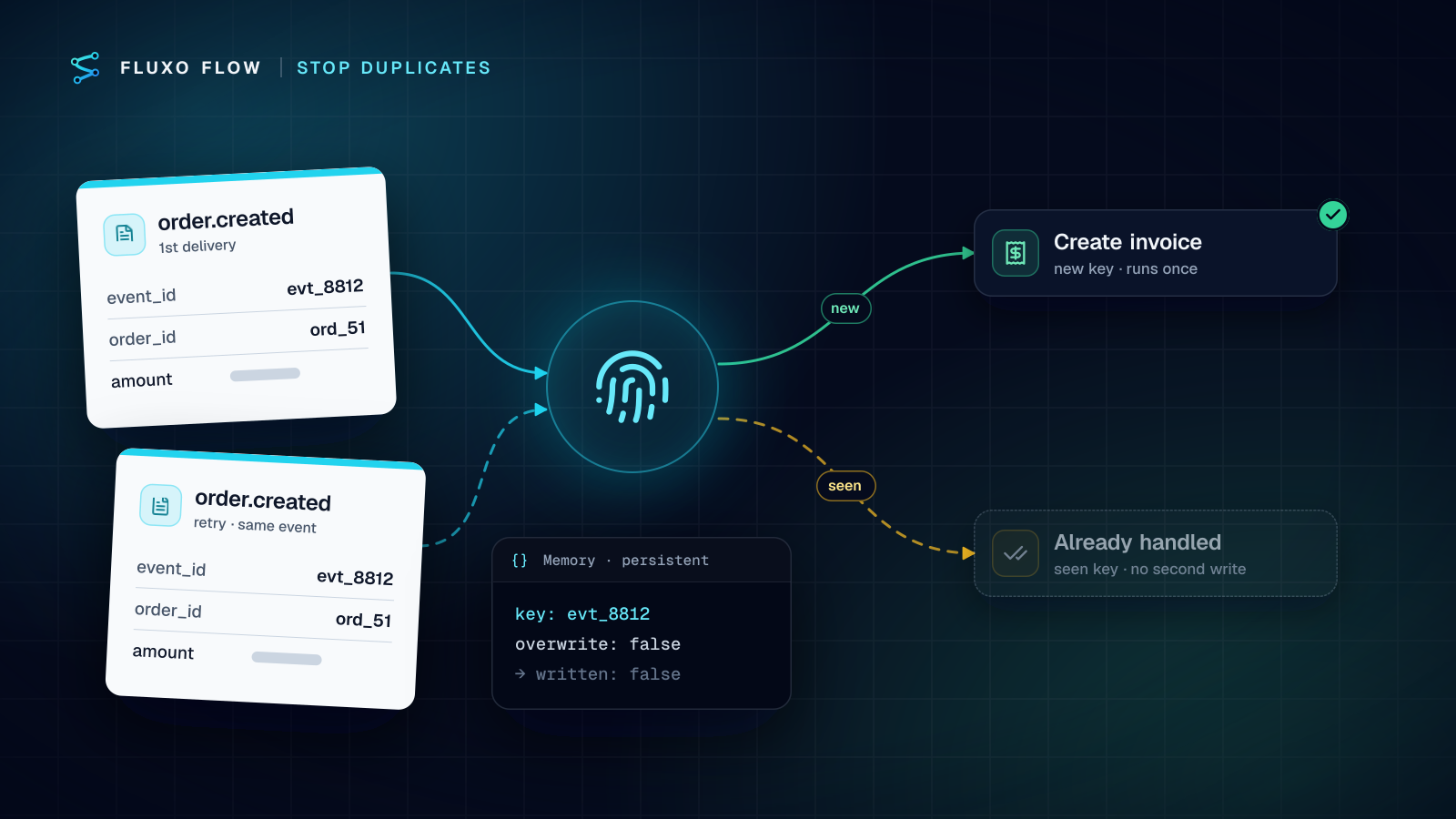
Check data before it enters your system, not after. Enforce types (dates, currency, IDs), reject blank required fields and compare the record count against the source file. A count mismatch is your cheapest early warning. Log every rejected row instead of dropping it, so you can reprocess rather than retype. Duplicates deserve their own check; this guide to preventing duplicate records covers dedupe keys and find-or-create.
Human review for the steps that matter
Not every step needs approval. Route only the irreversible ones: invoices sent, records written to your books, customer-facing replies. In Fluxo Flow, a Human Review step pauses the run and puts the item in a Review Queue where a person approves, edits or rejects it. Live runs and Human Review are on paid plans; the Free plan lets you build and Dry Run.
Watch the runs, not just the errors
Errors are easy to see: Fluxo Flow's run history shows every step's inputs, outputs and status, and an Error Handler step can catch a failure and alert you. The harder failures are runs that finish but write the wrong thing. Until you trust a workflow, spot-check a sample of its output against the source each week.
The practical takeaway: start with the source that costs you the most typing, pick its method from the matrix above, and run it on sample data before it touches anything real.
How much does it cost to automate data entry for a small business?
It depends on the pricing model. Per-task tools bill each action step on every run, so a five-step flow running 200 times a day is roughly 30,000 tasks a month; check that against the vendor's published tiers. Flat-plan tools like Fluxo Flow start at $39/mo plus your AI provider's own rates. RPA and scripts mostly cost your time.
Can I automate data entry without knowing how to code?
Yes, for most sources. No-code workflow tools handle spreadsheets, accounting apps, webhooks and form submissions with a visual builder. The exceptions are green screens and legacy portals without APIs, which need RPA or browser scripting.
Is it safe to let automation enter data into QuickBooks?
It can be, with two safeguards: post through the QuickBooks API or an app connection rather than screen scraping, and route anything uncertain to a person before it posts. Test the workflow on sample data first so nothing reaches your books until the logic is right.
How long does it take to set up data entry automation for one process?
Plan an afternoon for a simple case: map the manual steps, structure the sheet, add a trigger and test sample records, including one with a missing field and one duplicate. Cross-system work, like Excel feeding a web form or exports from an AS400, takes longer because you're checking for APIs and building review steps.
What's the difference between RPA and workflow automation for data entry?
Workflow automation connects systems through APIs and structured inputs, so it's cheaper to run and breaks less often. RPA mimics a person clicking a screen, which is the only option for systems without APIs, but it breaks whenever the interface changes. Use workflow automation wherever an API exists.
About this guide: written and edited by Husam Daoud with help from AI tools. Prices, plan limits and integration details come from Fluxo Flow's own product data, so they stay current.
See it work before you pay.
No card needed to start. Every step can be checked with sample data first, and AI is billed by your own provider.
- data entry
- workflow design
- reliability
- testing
- dry run
- human review
- Zapier