Guides
A practical guide to human-in-the-loop AI workflows
Where to put human checkpoints in AI automations, how to design reviews people can finish in seconds, and how to loosen the loop safely as trust grows.
"Human in the loop" gets used as a reassurance: don't worry, a person checks the AI. In practice the phrase covers everything from a careful approval step to a Slack message nobody reads. Done well, it lets you automate work that would otherwise be too risky to automate. Done badly, it's either a bottleneck that makes the automation pointless or a rubber stamp that gives false comfort.
The short version: put a person immediately before any step that is hard to undo (a customer message, a payment, a record others rely on), give them everything needed to decide in under thirty seconds, always set a timeout, and loosen the loop only when the data says people agree with the AI. The rest of this guide covers where checkpoints belong, how to design reviews people can actually do well, and how to step down from "review everything" safely.
Why it matters beyond your own workflows
Human oversight is also where regulation and risk frameworks are heading. The EU AI Act's Article 14 requires high-risk AI systems to be designed "in such a way, including with appropriate human-machine interface tools, that they can be effectively overseen by natural persons during the period in which they are in use." NIST's AI Risk Management Framework, a voluntary framework first released in January 2023, treats human oversight as part of managing AI risk too. Most business automations aren't "high-risk" in the Act's legal sense, and this isn't legal advice, but the design principle carries over: a person who can see, understand and stop what the AI is about to do.
What a human checkpoint is for
A checkpoint exists to catch the mistakes that matter before they become real. That gives you a test for every checkpoint you're considering: what mistake does this catch, and what would it cost if it got through?
If the honest answer is "nothing much," you don't need a checkpoint there. If the answer is "a customer gets a wrong price" or "we pay a fraudulent invoice," you do.
Where to put checkpoints
Most workflows have a natural place for a human: just before the step that's hard to undo. Look for these:
- Messages to customers or the public. AI-drafted emails, replies, social posts.
- Money. Payments, refunds, credits, price changes.
- Records other people rely on. Changes to CRM data, contracts, account status.
- Low-confidence AI output. When the model says it isn't sure, or a Validator finds a problem.
- Unusual cases. New vendors, first-time customers, amounts far above normal.
Put the checkpoint as late as possible, right before the irreversible step, so the reviewer sees the final thing, not an intermediate draft.
Three patterns that cover most cases
1. Review everything
Every item pauses for approval. Use this when a workflow is new, when the stakes are high on every item, or when volume is low enough that reviewing everything is cheap.
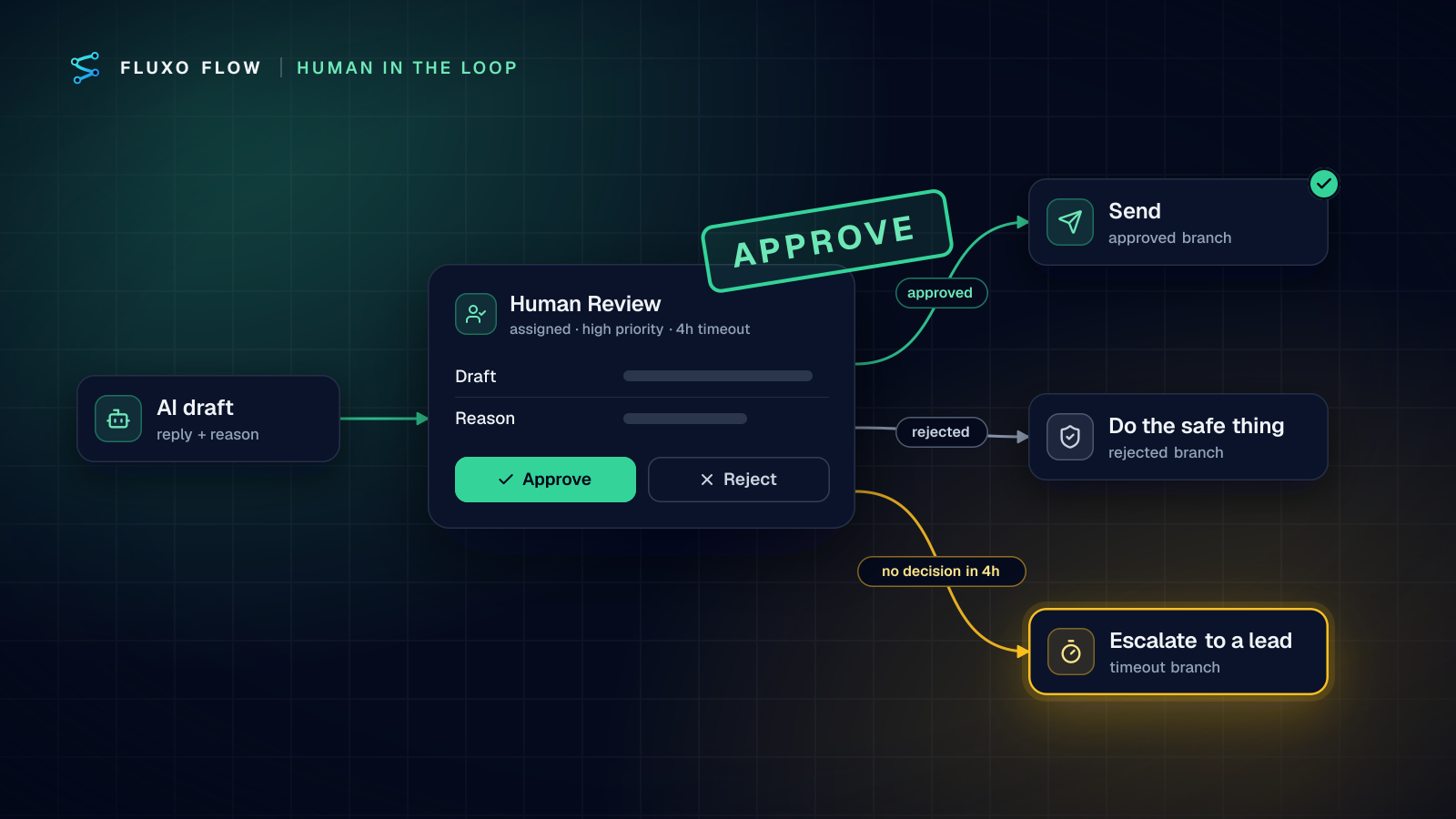
The classic shape: Trigger → AI step (draft) → Human Review → Output. The AI does the slow work of drafting, and the person does the fast work of approving or fixing.
2. Review by exception
Most items go straight through and only some pause. A Router decides which, based on facts: the amount, the customer tier, the AI's confidence, whether a Validator passed. This is where most mature workflows end up.
3. Review a sample
Everything goes straight through, but a percentage is routed to review for quality checks. Use this for high-volume, low-risk work where you mainly want to catch drift, such as a model update quietly changing output quality.
Designing a review people can do well
The quality of a checkpoint depends almost entirely on what the reviewer sees and how long it takes. Aim for a decision in under thirty seconds.
Put everything needed for the decision in the prompt. In Fluxo Flow, the Human Review step has a prompt the reviewer sees in the Review Queue. Template in the facts: the customer, the amount, the draft, the AI's stated reason, which checks passed. A reviewer who has to open three other systems will start approving without looking.
Ask a specific question. "Review this" invites a vague skim. "Approve sending this reply to a customer on the Enterprise plan who asked about a refund?" invites a real decision.
Make the AI explain itself. Ask the AI step for a one-line reason alongside its output. Reviewers decide much faster when they can see why the model chose what it did, and they catch bad reasoning more easily than bad output.
Highlight what's unusual. If a Router sent an item to review because something was off (new vendor, low confidence, failed check), say so in the prompt.
Making sure reviews actually happen
A checkpoint nobody attends to is worse than none, because it creates a pile of stuck work. Design for that:
- Assign an owner. Reviews can be assigned to a specific teammate, and reassigned one at a time or in bulk. A shared queue with no owner is how things sit for days.
- Set priorities. Mark urgent items so they're handled first.
- Always set a timeout. If nobody decides in time, the run follows its timeout branch. Make that branch useful: escalate to a lead, send a safe default, or close the item with a note. Never let "nobody looked" mean "silently approved."
- Tell people. Reviewers get a notification in the app's bell. If your team works in Slack, add a Slack Post step before the review so the channel knows something is waiting.
- Use bulk actions for the easy ones. The Review Queue lets you approve or reject several items at once.
Who should review?
Give reviewing to people who understand the consequences, and keep it separate from building. In Fluxo Flow, anyone with the Support Agent role or above can decide reviews, Viewers can see the queue but not decide, and building workflows is a separate set of roles. That lets you have, for example, an operations specialist build the workflow and a finance lead approve payments.
What to do with rejections
A rejection is information. Design the rejected branch to:
- Do the safe thing. Don't send, don't pay, don't update.
- Notify whoever needs to know. The requester, the account owner, the AP team.
- Leave a trail. The run history records what happened, so you can review rejections later.
Then actually review them. Once a month, look at what was rejected and why. Recurring rejections usually point to a prompt to improve, a missing check, or a threshold set in the wrong place.
Test every branch before going live
Human-in-the-loop workflows have more branches than most: approved, rejected and timeout, for every review step. Test them all before going live. In a Dry Run, each Human Review step uses a decision you pick (approved, rejected or timeout), so you can walk every branch in seconds without anyone clicking anything and without any real side effects.
Loosening the loop as trust grows
The goal isn't to review everything forever. It's to earn the right to review less. A safe progression:
- Week one: review everything. Track how often people approve without changes.
- When approvals without edits are consistently high, move to review by exception. Route only low-confidence, high-value or unusual items to a person.
- Keep sampling. Route a small share of auto-approved items to review, so you notice if quality drifts.
- Never remove the checkpoint from irreversible, high-stakes steps. Some decisions, like changing a vendor's bank details, should always have a person.
Make each change one at a time, compare runs before and after, and keep the previous version so you can restore it if needed.
The takeaway
Good human-in-the-loop design puts a person exactly where a mistake would be expensive, gives them everything they need to decide in seconds, and makes sure the review actually happens. Start by reviewing everything, measure how often people agree with the AI, and loosen the loop only where the evidence says it's safe.
Two worked examples to start from: the invoice approval template (review by amount) and the support reply drafter (review every AI-drafted reply). Or start free, build your own with a Human Review step and Dry Run every branch.
Put this into practice
Build it on the canvas and Dry Run it on the Free plan, with no credit card. Run it live on a paid plan, on your own AI key.
- human in the loop
- human review
- AI safety
- workflow design