Guides
No Code AI Workflow Automation: A Buyer's Guide
How to choose a no code AI workflow automation tool: integrations, pricing model, testing and human review, plus a 12-point checklist to score any platform.
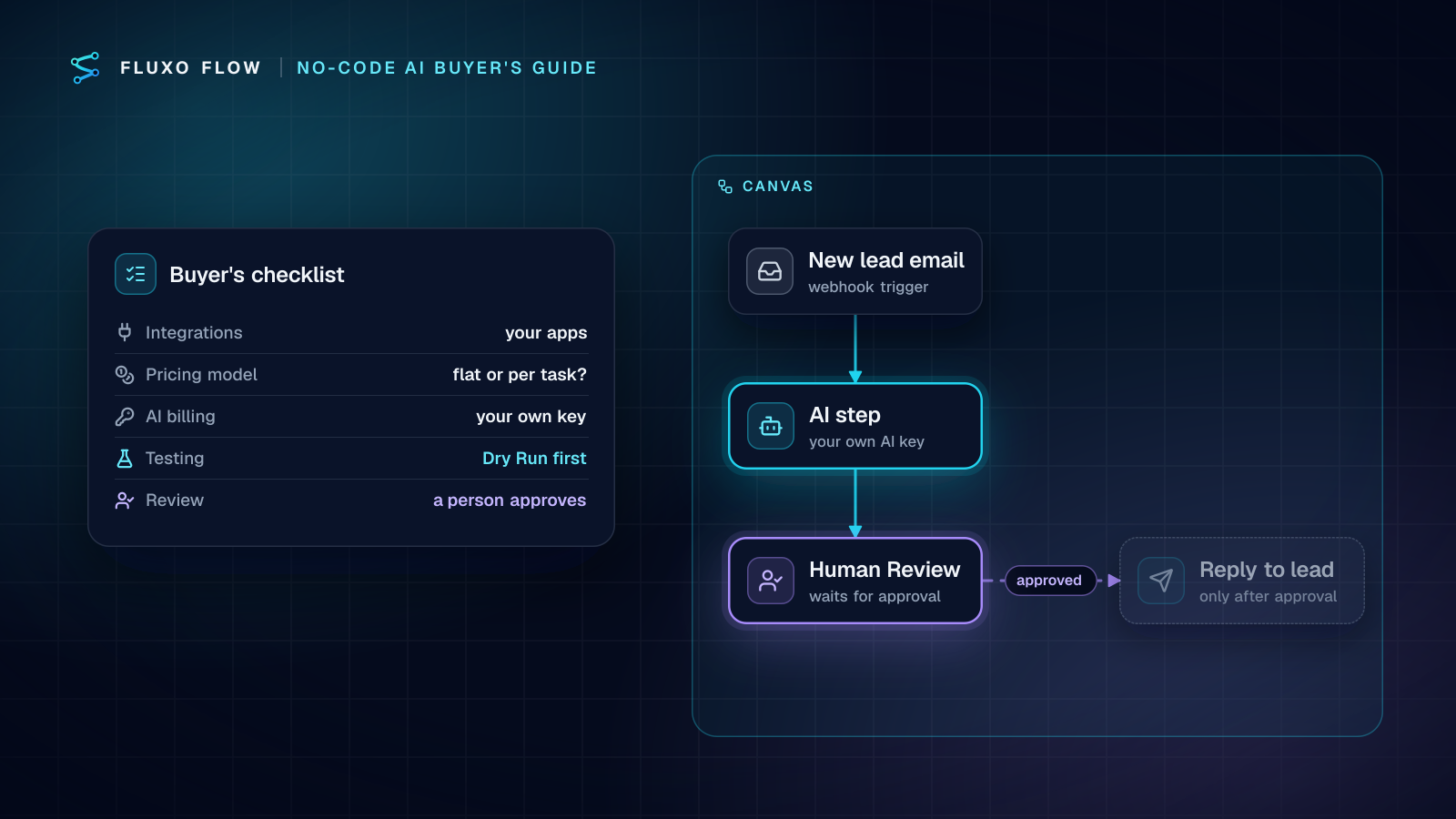
No code AI workflow automation lets you connect your inbox, CRM and AI models on a visual canvas, so lead intake, support triage and bookkeeping run without retyping. To choose a tool, compare three things: which of your apps it connects to, how it bills as workflows grow, and how much control you keep before AI output reaches a customer.
Key takeaways
- AI workflow automation adds judgment steps, like classifying an inbound email, inside otherwise fixed rule-based workflows.
- Per-task pricing multiplies with workflow length: a workflow with 10 action steps running 20 times a day is about 6,000 tasks a month.
- Bring-your-own-key pricing bills AI tokens at cost from your own provider account, which makes AI spend visible and easier to forecast.
- Test workflows with a dry run on sample data, and route client-facing steps through human review before going live.
- Solo founders should start with two or three back-office processes, like lead intake and AR follow-up, then expand after a clean month.
What is workflow automation in AI?
Classic automation: fixed rules between two tools
Classic automation connects two apps with a fixed rule: when this happens, do that. A new form submission creates a row, sends an email, done. The logic is deterministic, which is a strength until reality varies. If the input changes shape, the workflow breaks or quietly does the wrong thing.
AI workflow automation: judgment steps inside the workflow
AI workflow automation adds steps where the tool has to make a call instead of following a rule. Reading an inbound email and deciding whether it's a quote request, a support issue or spam is a judgment step. The plumbing around it stays fixed, but the middle now interprets messy input and produces output you'd previously have written yourself.
Where an AI agent fits in
An AI agent is a judgment step with more latitude: it can pick which tool to call or ask for missing information. That latitude is useful, and it's also the reason control matters, which the sections below cover.
Why do per-task bills grow so fast on multi-step workflows?
How per-task pricing multiplies
Zapier counts a task for each action step that runs (Zapier pricing). A workflow with 10 action steps uses 10 tasks per run, so running it 20 times a day uses about 6,000 tasks a month. Add a second workflow like it and the count doubles, even though you built both in the same afternoon.
The pricing models side by side
| Model | What you pay for | Gets expensive when | Examples |
|---|---|---|---|
| Per task or per operation | Every counted step in every run | Workflows get longer or volume grows | Zapier, Make |
| Per execution | Each full workflow run, however many steps | Run volume grows | n8n Cloud (n8n pricing) |
| Flat plan + your own AI key | Workflows and seats, plus AI tokens billed by your provider | You run heavy AI volume (but you see the real cost) | Fluxo Flow |
| Self-hosted | Your own server and your time | You become the ops team | n8n self-hosted |
An illustrative example, priced three ways
These numbers are illustrative, not quotes. Take a lead-intake workflow with 10 action steps that runs 20 times a day:
- Per task: about 6,000 tasks a month, which on Zapier means a plan sized for that volume.
- Flat plan with your own key: on Fluxo Flow, plans start at $39/mo. The step count doesn't change the bill; you also pay your AI provider for the tokens the AI steps use, at their published rate.
- Self-hosted: the cost of a server, plus your time keeping it updated and running.
What breaks when you connect AI to brittle workflows?
Fragile triggers and unhandled payloads
Most classic automations break the same way: a webhook arrives with a missing field, an API renames a key, and a step that assumed a fixed shape throws an error. On per-step pricing, retries of a failing run can also add to your bill.
Why AI steps need error handling classic steps never did
AI steps fail differently. A model can return malformed JSON, an empty answer or a confident wrong one, and the step still "succeeds" as far as the runtime knows. Error handling has to cover content, not just HTTP status codes. The design that holds up:
- Check the shape of the payload at the trigger.
- Validate the AI output against a schema before anything acts on it.
- Test the whole workflow before it goes live.
- Put a human review step before anything customer-facing sends.
None of this stops an upstream API from changing without notice. It means you find out from a failed check, not from a customer.
How much control do you have over AI output before it reaches a customer?
Most platforms let you turn a workflow on and hope. The question worth asking any vendor: can you see what the AI would have sent before it sends it?
Dry Run: testing a workflow without live consequences
In Fluxo Flow, a Dry Run walks the whole workflow on sample data with every external action simulated. Nothing emails a client, nothing writes to your CRM, and AI steps don't call your provider, so testing costs nothing. You check each branch, fix what's wrong and run it again until the logic holds up.
Human Review and a Review Queue for the steps that matter
For steps where a wrong draft costs money, like a reply to a lead or an invoice note, a Human Review step pauses the run and puts the output in a Review Queue. A person approves, edits or rejects it, and the run continues down the matching branch. Steps that are safe to automate run without you.
What happens when a platform offers neither
Without testing or review, your first feedback is the client's reply. On many platforms you can build an approval step yourself, but then you maintain it, and most teams skip it until something embarrassing ships.
Bring your own key: who pays for the AI tokens?
Bring your own key (BYOK) means you connect your own API key from a provider like OpenAI, Anthropic or Google. The provider bills you directly for tokens at its published rate. The platform charges for the software, not for the AI.
Markup on AI calls vs billed at cost
Platforms that bundle AI often sell it as credits, so you can't see what the model actually cost. With BYOK billed at cost, an AI step costs exactly what your provider charges for it. Fluxo Flow works this way: your key, billed at cost, no AI markup. There's more on the math in what bringing your own AI key costs.
Choosing the model per step
BYOK lets you pick the model per step: a small, cheap model for sorting and extracting, a stronger one for writing a reply. Fluxo Flow supports 15 AI providers, and each AI step can use a different model.
The trade-off: you manage the key and the usage
You own the API account, so you also own rate limits, key rotation and the provider bill. If your workflow spikes, your provider invoice spikes. Platforms that bundle AI take on that work in exchange for their margin.
The 12-point checklist for evaluating a no-code AI workflow automation platform
Score each point 1–4 for every platform you're considering.
Integrations and webhooks
- Does it connect to the tools you already pay for? Count the ones you'd actually use this quarter, not the total in the directory.
- Can it start a workflow from an inbound webhook?
- Can it send a signed webhook out, so the receiving system can verify it came from you?
- Can it start workflows from app events (a new contact, order or booking), not only from schedules?
Pricing model and predictability
- Can you predict next month's bill from this month's run volume?
- Do you pay per step, per run, per seat or per workflow?
- How is AI billed: credits with a margin, or your own key at cost?
- What happens at a plan limit: does anything stop working, or do you just stop adding?
Testing, review and control
- Can you test a workflow end to end before it goes live, without sending anything or paying for AI?
- Can you route specific steps, like a discount approval or a support reply, to a person who signs off before anything ships?
- When a run fails midway, do you get an error that points at the step, or a silent partial run you discover a week later?
- Can you see every step of every run, with inputs, outputs and AI cost?
A platform that only offers build-and-hope fails the last group, no matter how good its canvas looks.
Scoring Fluxo Flow against the same checklist
Fluxo Flow scores well on predictability: flat plans priced by workflows and seats, no per-task fees, AI on your own key from 15 providers at cost, and Dry Run testing on every plan, including Free. It supports inbound webhooks, signed outbound webhooks, app-event triggers, Human Review and step-by-step run history. Live runs and the Review Queue need a paid plan; the Free plan is for building and Dry Running.
Where it falls short: its integration library is smaller than Zapier's or Make's, so if your stack depends on a niche connector, check it exists before you commit, or plan to use the HTTP step.
How do the main platforms compare?
- Zapier and Make bill per task or per operation, so longer workflows cost more each time they run.
- n8n bills its cloud plans per execution and can be self-hosted, which suits technical operators (n8n pricing).
- Activepieces publishes a free tier and paid plans on its pricing page.
- Fluxo Flow prices flat by workflows and seats, runs AI on your own key at cost, and builds testing (Dry Run) and approval (Review Queue) into the canvas.
If you live on long-tail integrations, check coverage first, whichever tool you pick.
Which back-office workflows should a solo founder automate first?
Lead intake and triage
Start with the workflow you handle most often. If leads arrive by email or form, a workflow can read the submission, score or categorize it, draft a reply and hold it for your approval before anything reaches the customer. Approve the first few dozen runs yourself, then loosen the review once the drafts match what you'd have written. The AI lead qualification template is a starting point.
AR follow-up and bookkeeping drafts
Collections follow-ups are repetitive, low-risk and easy to test. A workflow can scan unpaid invoices, draft a polite reminder per aging bucket and hold each draft for approval. The same pattern works for bookkeeping: draft categories and a weekly summary, review them in one sitting, and hand your bookkeeper clean output.
Start with a handful of processes, not a whole department
Pick two or three processes with clear inputs and a human checkpoint. Test each one before it goes live, keep your own AI key so token costs stay visible, and expand only after the first workflows have run cleanly for a month.
Is no-code AI automation reliable enough for client-facing emails?
It can send something wrong if you give it full autonomy on day one. A model can return a confident but incorrect draft, and the runtime treats it as a success. Route client-facing steps to human review so you approve or edit drafts, and test the workflow before it goes live. Loosen the review once the output consistently matches what you'd have written.
How much does it cost to run AI inside a workflow every month?
It depends on the pricing model. A workflow with 10 action steps running 20 times a day is about 6,000 tasks a month on per-task platforms. On a flat plan with your own key, you pay the plan plus your provider's token charges at its published rate. Self-hosting costs a server plus your maintenance time. Treat all of these as estimates and check each vendor's current pricing page.
Can I switch from Zapier or Make without rebuilding everything?
Partly. Fluxo Flow imports Make scenario blueprints and n8n workflow exports on a best-effort basis: common steps are converted, a report shows what didn't convert, and credentials are never copied, so you reconnect your apps. Zapier has no export Fluxo Flow can read, so Zaps are rebuilt on the canvas or started from a template. Either way, check that the integrations you rely on exist before switching.
Do I need to write prompts or have an API key to start?
Not to start. You can build a workflow and Dry Run it without an AI key. To run AI steps live, bring-your-own-key tools need you to create an API key with a provider like OpenAI or Anthropic, which takes a few minutes, and in return you see exactly what each AI step costs.
What's the difference between an AI agent and a regular automation step?
A regular step follows a fixed rule: when this happens, do that. An AI step makes a judgment call, like deciding whether an email is a quote request or spam. An agent goes further, choosing which tools to call or asking for missing information. That extra latitude is useful, and it's why testing and human review matter before anything reaches a customer.
The next step: pick one process from the list above, score two or three tools against the checklist, and test the winner before it touches a customer.
About this guide: written and edited by Husam Daoud with help from AI tools. Prices, plan limits and integration details come from Fluxo Flow's own product data, so they stay current.
Automate the busywork, keep the final say.
Approvals, Dry Run and run history are part of the product. Explore for free and go live when it earns its keep.
- no-code
- AI automation
- workflow automation
- pricing
- human review
- buyer's guide