Playbooks
Recruiting automation: what to automate in Bullhorn and Greenhouse (and what never to)
Recruiting automation for Bullhorn and Greenhouse with a hard line: AI summarizes, people decide on candidates. Five safe workflows and the legal context.
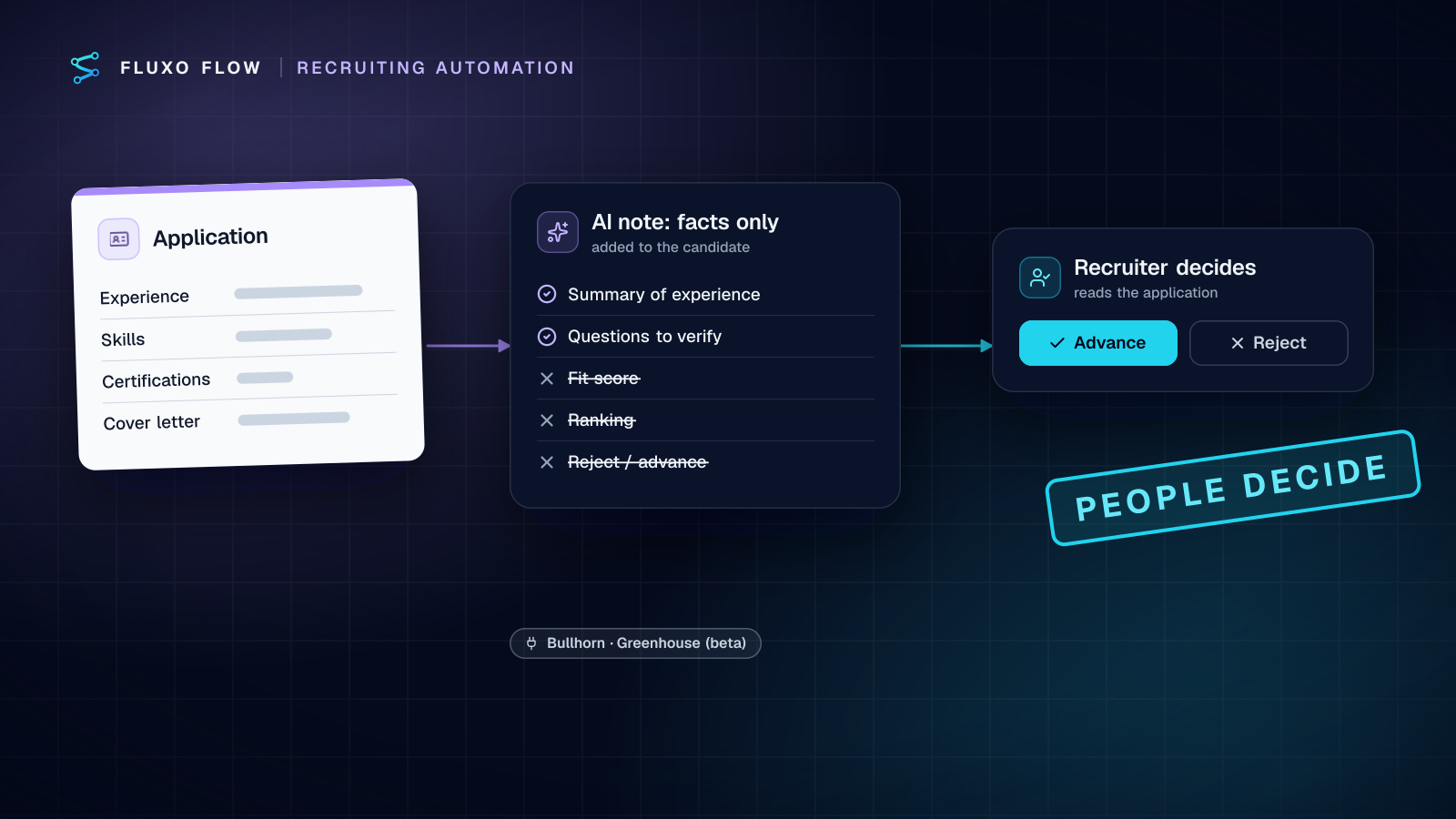
Short answer: in recruiting automation, let software do the organizing and let people make every decision about a candidate. Automate notifications (new job orders, new applications), record hygiene (duplicate checks, notes), factual AI summaries added to the candidate record, and onboarding hand-offs after a hire. Never let a workflow score, rank, advance or reject candidates on its own. That line is practical (recruiters won't trust a black box) and legal (laws like New York City's Local Law 144 regulate automated hiring tools). Below are five workflows for Bullhorn and Greenhouse that stay on the right side of it.
The line: assist vs decide
Every recruiting workflow I design passes one test: if this step went wrong a thousand times, would any candidate be treated differently without a person choosing it? If yes, a person must be in that step.
| AI and automation may | AI and automation must not |
|---|---|
| Summarize what a candidate wrote | Score or rate candidates |
| Extract dates, titles, certifications into a note | Rank or shortlist |
| Draft questions for the recruiter to ask | Recommend advance or reject |
| Notify the team about new job orders and applications | Move an application to a new stage on its own |
| Flag duplicates for a person to merge | Reject an application |
| Hand off a hired candidate to onboarding | Send a decision to a candidate unreviewed |
The right column isn't "never automate"; it's "never automate the decision." A recruiter can make a decision and a workflow can carry it out afterwards. The order matters.
Compliance context (not legal advice)
New York City's Local Law 144 of 2021 regulates "automated employment decision tools": computational processes, including AI, that issue a simplified output such as a score, classification or recommendation used to substantially assist or replace discretionary hiring decisions. According to the city's Department of Consumer and Worker Protection (DCWP AEDT page, checked October 4, 2026), employers and employment agencies may not use such a tool unless it has had a bias audit within one year of use, information about the audit is publicly available, and required notices go to candidates; DCWP's guidance says notice must come 10 business days before use. Enforcement began July 5, 2023.
Other jurisdictions have their own rules, and more are coming. I'm not a lawyer and this isn't legal advice. The design principle in this post, AI produces facts, not verdicts, is a sound engineering choice everywhere, but whether a specific workflow counts as an automated decision tool where you hire is a question for employment counsel.
What this means in practice: the AI summary in workflow 1 below deliberately contains no score, rating, fit label, ranking or recommendation. The recruiter reads the application; the summary helps them read it faster.
Five safe workflows
Both connectors are beta and work with your own API access: Greenhouse (beta) uses Harvest API v3 with OAuth client credentials a Greenhouse Site Admin creates; Greenhouse removed Harvest v1/v2 on August 31, 2026 (Harvest docs). Bullhorn (beta) uses the OAuth client credentials Bullhorn Support issues plus an API user (Bullhorn REST API reference).
1. New application → factual summary note → recruiter
Greenhouse "New application" trigger (or the instant "Greenhouse web hook") → Transformer (strip contact details) → AI Generate → Validator → Guardrail → Greenhouse "Add a note to a candidate" → Slack to the recruiter.
The AI step gets the job's listed requirements and the application text, and returns: a three-line summary of experience, the dates and titles it found, certifications mentioned, and two or three questions the recruiter should ask to verify claims. The prompt forbids opinions: no "strong," "weak," "good fit," no numbers.
A Validator enforces the schema. A Guardrail in block mode stops the run if the output contains evaluative words you list (good fit, poor fit, score, recommend, reject, strong candidate; it matches plain text, so use phrases rather than short words like "fit" that hide inside "benefit") or fields you have blocked. Blocked runs go to a person, not to the note.
Decides: nothing. The recruiter reads the application and the note.
2. New job order → team alert and intake
Bullhorn "New job order" trigger → Bullhorn "Get a record" → Slack "Post a message" to the recruiting channel → Google Sheets "Add a row" to the intake tracker.
The most common complaint I hear from staffing agencies is that new orders sit unnoticed for hours. This fixes it without any AI.
Decides: nothing.
3. Duplicate candidate check
Bullhorn "New candidate" trigger → Bullhorn "Search candidates" (email:"…") → Router → Slack to the record owner + Bullhorn "Add a note".
Duplicates split a candidate's history across records. When a new candidate shares an email with an existing one, the workflow flags it for a person to merge. Don't auto-merge: the person knows which record has the right history. In Greenhouse, "Find a candidate by email" does the same job before you create a candidate from another source.
Decides: nothing. A person merges.
4. Recruiter rejects → follow-through, never the reverse
Greenhouse web hook (rejection event) → Router → Google Sheets row (job, stage, reason) → Slack to the hiring manager if the stage was late.
Here the human decision comes first, made in Greenhouse, and the workflow reacts. It logs rejection reasons by stage, which gives you the data for your own adverse-impact reviews, and tells hiring managers when a late-stage candidate exits.
If you ever do use the connector's "Reject an application" action (it exists, with a rejection reason), put a Human Review step directly before it, assigned to the recruiter, with the reason in the prompt and no timeout that defaults to rejection. Set the timeout branch to "notify the recruiter," never "reject."
Decides: nothing new. The recruiter already decided.
5. Hire → onboarding hand-off
Greenhouse web hook (hire event) → Notion "Create a page in a database" (onboarding checklist) → Slack "Create a channel" and "Invite people to a channel" → email the hiring manager.
For staffing agencies, the same hand-off fits Bullhorn placements: when a recruiter decides to place a candidate, a Human Review step confirms the details and the approved branch runs Bullhorn "Create a placement" and the onboarding steps.
Decides: nothing. The hire or placement decision was made by people.
Candidate data hygiene
Candidate data is personal data, and AI steps send it to the provider whose key you connected. Fluxo Flow is bring-your-own-key, so prompts go to that provider under your own agreement, including its retention and training settings. Minimize anyway:
- Strip before the AI step. A Transformer maps only the fields the summary needs: work history, skills, certifications. Drop name, email, phone, address, photos and links to social profiles.
- Never send protected characteristics. Date of birth, gender, ethnicity, disability, marital status: if your ATS stores them, they don't enter a prompt. Add them as blocked fields on a Guardrail so a mapping mistake stops the run.
- Don't store AI output outside the ATS. The note belongs on the candidate record, where your retention policies apply.
- Check your provider settings for data retention and training opt-outs before connecting the key.
Questions to ask before adopting any AI screening tool
Vendors will pitch AI that "finds the best candidates." Whether you build or buy, ask these before it touches a real applicant:
- What exactly does it output? A summary a recruiter reads is different in kind from a score, a ranking or a yes/no. Get a sample output.
- Who acts on the output, and how? If recruiters sort by a score or only open the top results, the tool is shaping decisions even if a person clicks the button.
- Has it been bias-audited, and is the summary public? In New York City that's a legal requirement for covered tools, not a nice-to-have.
- What candidate data goes to which AI provider, and how long is it kept?
- Can you turn it off per job, per location, per stage? Hiring in several jurisdictions means different rules for different reqs.
- What happens when it's wrong? Is there a log of every output, and can a candidate's record show what the tool said about them?
If a tool can't answer these clearly, it isn't ready for your candidates, however good the demo looks. The workflows in this post are designed so the answers are short: summaries only, recruiters decide, minimal data, every output logged on the candidate record.
Test it like a compliance review
Before switching anything on:
- Dry Run each workflow with sample applications. Dry Run simulates every Greenhouse, Bullhorn and Slack call, so nothing is written to your ATS.
- Run ten real applications live with the "Add a note" step pointed at a test job or sandbox, and have a recruiter read every summary for evaluative language and omissions.
- Write down, per workflow, which step a person decides in. If you can't point to it, the workflow isn't ready.
Live runs and app triggers start on Basic; the Free plan builds and Dry Runs only.
The takeaway
Automate the noise around hiring, not the judgment in it. Summaries, alerts, duplicate checks and hand-offs give recruiters hours back; scores and auto-rejections create legal exposure and erode trust. Keep every candidate decision with a person, and make the workflow carry it out afterwards.
Start with workflow 2 (no AI, immediate value), then add summaries with a Guardrail. For the review step itself, see how Human Review works and the human-in-the-loop guide.
Frequently asked questions
Is it legal to use AI to screen candidates?
It depends on where you hire and how the tool is used. New York City's Local Law 144, for example, requires a bias audit, a public summary and candidate notices before using an automated employment decision tool. This isn't legal advice; check with employment counsel before using AI anywhere near candidate decisions.
Can Fluxo Flow reject candidates automatically in Greenhouse?
The Greenhouse connector has a 'Reject an application' action, but we recommend never using it without a Human Review step where a recruiter makes the decision. A safer pattern is to let recruiters reject in Greenhouse and have the workflow react to that event.
What should I automate in Bullhorn first?
Notifications and hygiene: alert the team about new job orders in Slack, and catch duplicate candidates by searching for the email before anyone creates a second record.
Does the Greenhouse connector use the new Harvest API?
Yes. Greenhouse removed Harvest v1/v2 on August 31, 2026, and Fluxo Flow's Greenhouse connector uses Harvest v3 with OAuth client credentials.
Put this into practice
Build it on the canvas and Dry Run it on the Free plan, with no credit card. Run it live on a paid plan, on your own AI key.
- recruiting
- human review
- AI safety
- human in the loop