Playbooks
Law firm intake automation: organize inquiries, keep lawyers in control
Law firm intake automation that organizes inquiries for conflict checks, keeps staff review first and never gives legal advice: workflow, prompt, safeguards.
Most small firms lose time on intake in the same place: a web form arrives with three paragraphs of story, and someone has to work out what kind of matter it is, who's involved, whether anything is urgent and whether the firm can even take it before a lawyer spends a minute on it.
Short answer: law firm intake automation works best as an organizer, not a screener. Let AI turn each inquiry into a structured summary (matter type, parties, key dates, a factual description) and list every name for your conflict check. Then have staff review it before anything else happens: no record is opened, no matter is accepted and nothing that reads like advice is sent until a person has looked. Keep the data you send to the AI minimal, run it on a provider whose terms your firm has approved, and send only fixed, pre-approved acknowledgement text to the inquirer.
A clear line before we start: this post is about workflow design, not legal or ethics advice. Rules on prospective clients, confidentiality and technology vary by jurisdiction; check yours and your bar's guidance.
What AI should and shouldn't do in intake
| AI can do | AI should not do |
|---|---|
| Summarize what the person wrote, in their own facts | Assess the merits or say whether they "have a case" |
| Classify the matter type for routing to a practice area | Decide whether the firm takes the matter |
| List every person and company named, for the conflict check | Declare that there is or isn't a conflict |
| Flag mentions of dates, hearings or urgency for staff attention | Calculate or state deadlines, including limitation periods |
| Note missing information (no contact number, no opposing party named) | Write personalized replies to the inquirer |
| Produce consistent fields for your intake database | Give anything that reads as legal advice |
The left column is clerical work that a model does reliably when the output is structured. The right column is professional judgment, and an automated message that crosses into it creates risk for the firm and confusion for the person who wrote in.
The workflow
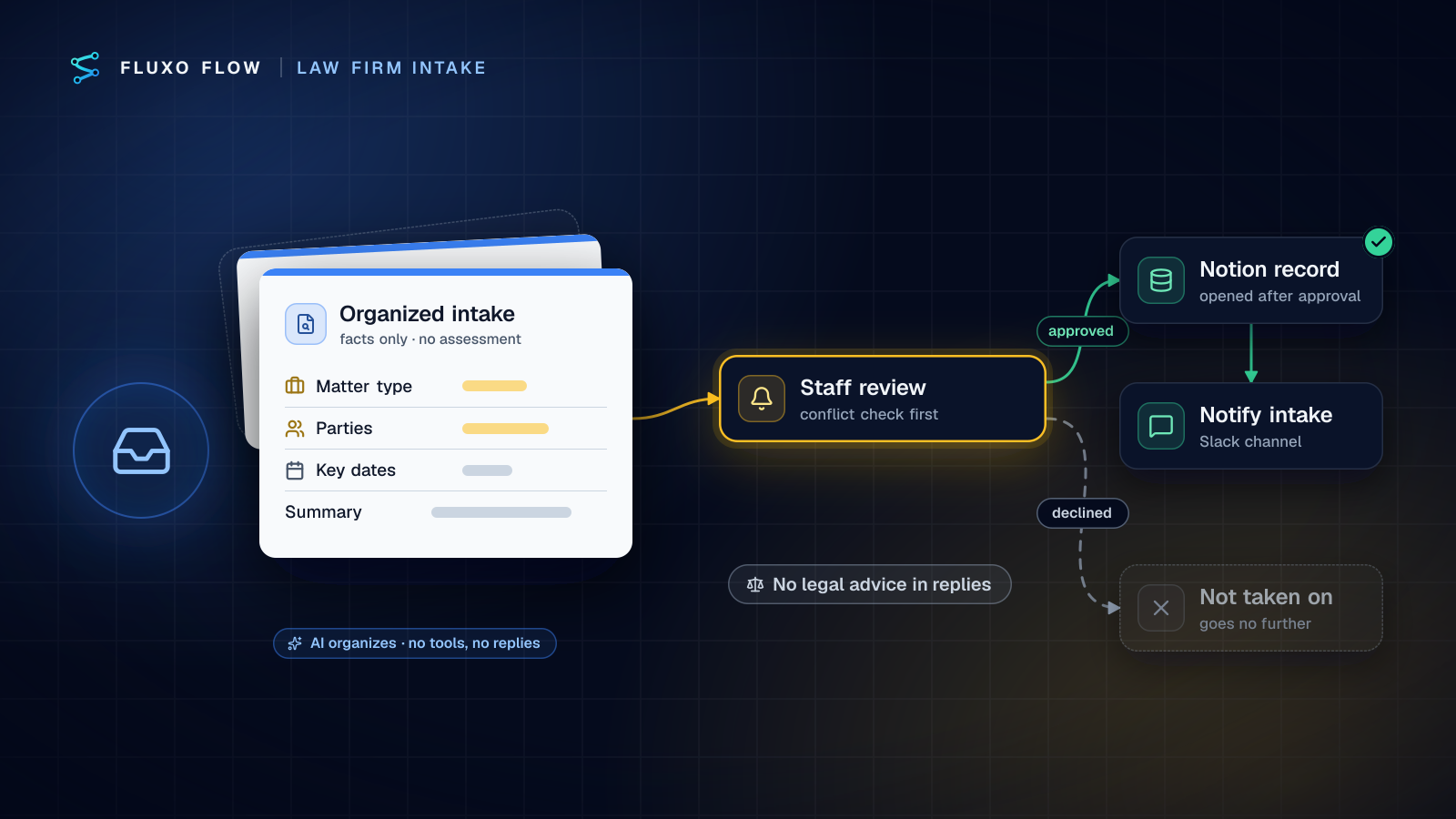
The law firm intake organizer template implements exactly this split:
- Webhook trigger, "Intake form submitted": your website form posts each new inquiry.
- AI step, "Organize the intake": returns strict JSON with
contact_name,contact_email,matter_type,parties,key_dates,summaryandtime_sensitive. Its system prompt tells the model to summarize only what the person wrote, list every person and company for the conflict check, and not give legal advice, assess the merits or predict outcomes. - Human Review, "Staff review and conflict check": high priority, assigned to your intake staff. The reviewer reads the summary, runs the conflict check on the listed parties in your own system, and approves or rejects.
- Approved → "Open intake record in Notion": creates a page in your intake database with the summary.
- → "Notify the team": a Slack message tells the intake channel a new record is ready for attorney review.
- Rejected → "Not taken on": the inquiry goes no further.
Notion (live) and Slack (live) are both live connectors. If your firm uses a practice management system instead of Notion, point the record step at its API with an HTTP Request step; the review-first structure stays the same.
Three additions I'd make for most firms:
- A Router on
time_sensitive. Time-sensitive intakes get an urgent priority and a direct Slack mention to the intake lead. The AI only flags that a date was mentioned; a person decides what it means. - A timeout on the review. If nobody picks up an intake within your target window, the timeout branch escalates to a named person rather than letting it sit.
- A Transformer before the AI step that drops fields the organizer doesn't need (more on that below).
Conflict-check data extraction
The most valuable thing the AI step does is the most boring: a complete list of names. Inquiries mention people in passing ("my ex-husband's company", "the landlord, Mr. Patel, and his brother") and a tired reader misses them. Ask for every one.
Practical rules for the parties field:
- List names as written, plus the role if stated. "Arjun Patel (landlord)", "Patel Properties LLC (landlord's company, per inquiry)". Don't let the model normalize or merge names; spelling variants are for your conflict system to match.
- Include organizations and relationships, not just individuals: employers, insurers, related companies.
- Never ask the model whether there's a conflict. It has no access to your client list, and it shouldn't. The output is input to your check, not the check.
- Show the original text in the review. The reviewer should see the inquiry next to the extracted parties so a missed name is easy to spot.
Ask for less: minimal data by design
The safest information is the information you never collected. The ABA's ethics committee has warned about this in the prospective-client context: as the ABA Journal summarized Formal Opinion 492 (June 2020), "Lawyers should warn prospective clients against disclosing detailed information in these initial consultations", because the more a lawyer learns, the more likely it is to be "significantly harmful" information that complicates later representation (checked October 4, 2026).
That maps directly onto form and workflow design:
- Design the form for routing, not storytelling. Ask for contact details, the type of matter, the names of the other parties and a short description, with a visible note not to include confidential details yet.
- Send the AI only what it needs. A Transformer before the AI step can drop fields like uploaded documents, account numbers or free-text "anything else" boxes that don't help classification.
- Keep sensitive fields out of outputs. A Guardrail step can block a run if a field that must never reach Notion or Slack (a government id, for example) is present.
Auto-reply wording that avoids advice
The template doesn't send anything to the inquirer, and that's deliberate. If you want an acknowledgement, send fixed text, written and approved by the firm, from a Send Email step. Don't let the AI write it.
A wording many firms use as a starting point (have yours approved by the firm):
Thank you for contacting [Firm]. We've received your inquiry and a member of our intake team will review it. Submitting this form doesn't create an attorney-client relationship, and we can't give legal advice until we've confirmed we're able to represent you. If your matter is urgent, please call us at [phone number].
What to keep out of any automated message: anything about the strength of the matter, likely outcomes, fees for this specific matter, deadlines calculated from the facts, or a summary of the person's situation written back to them. Each of those can read as advice, and none of them should come from a model.
Confidentiality and provider terms
ABA Formal Opinion 512 (July 29, 2024) is the most direct guidance on generative AI from the ABA's ethics committee. As summarized in The Bar Examiner, it says that "before lawyers input information relating to the representation of a client into a GAI tool, they must evaluate the risks that the information will be disclosed to or accessed by others outside the firm", that informed consent is required before inputting such information into self-learning tools, and that lawyers "should read and understand the Terms of Use, privacy policy, and related contractual terms and policies" of any tool they use (checked October 4, 2026). Your state's rules and opinions may add to this.
How the workflow supports that evaluation:
- Your provider, your contract. AI steps run on your own provider key. Prompts go to the provider you chose, under your account and your agreement with them, including its training and retention settings. Fluxo Flow doesn't train models and doesn't resell AI.
- Your systems of record. Approved intakes land in your Notion and Slack, not in a separate intake database you don't control.
- Know the limits. Fluxo Flow doesn't hold a SOC 2 report, isn't HIPAA compliant and doesn't sign BAAs. The security page lists what it does have: encryption of credentials at rest, workspace isolation, roles and an append-only activity log that never records prompts or secrets. Decide with that in front of you.
- Treat inquiries as untrusted text. A web form is open to anyone, including people who write instructions aimed at the AI. The organizer pattern is resilient because the AI has no tools and no side effects of its own, and a person reviews before anything happens. See prompt injection in AI workflows for the general checklist.
Rolling it out
Run it in parallel first. For two weeks, let the workflow organize every inquiry while staff keep doing intake the old way, and compare: did the AI catch every party, classify the matter the way staff would, flag the urgent ones? Adjust the prompt where it didn't, then switch staff to working from the Review Queue.
Keep the review step permanently. The goal isn't to remove people from intake; it's to make sure the first person who reads an inquiry spends their time on judgment instead of retyping names. For more on designing reviews people can finish quickly, see the human-in-the-loop guide.
You can build and Dry Run the workflow free, with the AI, Notion and Slack steps simulated. Live runs start on Basic ($39/mo). Open the law firm intake organizer template, connect Notion and your AI provider, and try it on last month's inquiries with the names changed. Other professional-services patterns are on the industries page.
Frequently asked questions
Does AI give legal advice in this intake workflow?
No. The AI step only organizes what the person wrote: matter type, parties, key dates and a factual summary. It doesn't assess the case, predict outcomes or reply to the inquirer, and staff review every intake before a record is opened.
Can AI run the conflict check?
It shouldn't decide it. The AI lists every person and company named so staff can search them in the firm's own conflict system. Whether there's a conflict is a decision for the firm.
Is it acceptable to send intake information to an AI provider?
That's a question for your firm and your jurisdiction's rules. ABA Formal Opinion 512 (July 2024) says lawyers must evaluate disclosure risks before inputting client information into a generative AI tool and should read the tool's terms of use. Keep prompts minimal and choose a provider whose terms your firm has approved.
Is Fluxo Flow HIPAA compliant or SOC 2 certified?
No. Fluxo Flow doesn't hold a SOC 2 report, isn't HIPAA compliant and doesn't sign BAAs. The security page lists the controls it does have.
Put this into practice
Build it on the canvas and Dry Run it on the Free plan, with no credit card. Run it live on a paid plan, on your own AI key.
- legal intake
- human review
- AI safety
- human in the loop