Playbooks
Freight broker automation: six back-office workflows with DAT, Truckstop and McLeod
Freight broker automation, made concrete: six back-office workflows on DAT, Truckstop, McLeod and Tai TMS, with what stays human and what never goes to AI.
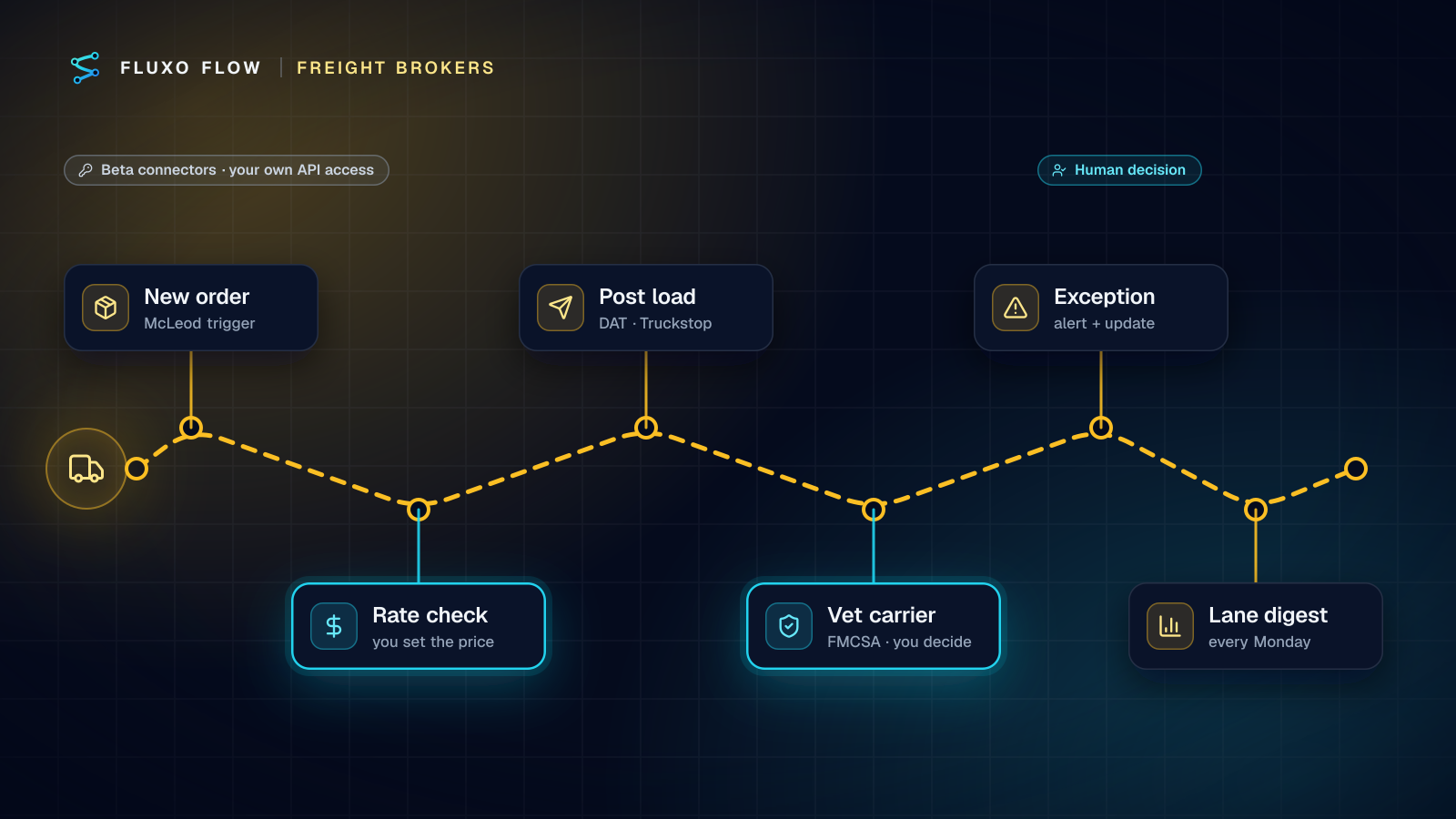
Short answer: freight broker automation pays off in the back office, not in replacing brokers. The six workflows worth building first are: (1) alert ops the moment a new order lands in the TMS, (2) pull market rates before quoting, with a person setting the price, (3) post loads to DAT and Truckstop from the order without retyping, (4) gather carrier vetting data from FMCSA before a person tenders, (5) catch shipment exceptions and update customers, and (6) send a weekly lane digest. All six run on connectors Fluxo Flow ships today in beta, with your own API access. Pricing and carrier decisions stay human in every one.
A note on what you won't find here: no "save 20 hours a week" numbers. I haven't seen a primary source for the savings figures that circulate in this space, and your savings depend entirely on your volume and process. Measure your own.
Before you start: connector status and what "beta" means
The freight connectors in Fluxo Flow are all beta: DAT (beta), Truckstop (beta), McLeod LoadMaster / PowerBroker (beta) and Tai TMS (beta). In practice that means:
- Bring your own API access. Each vendor gates its API behind your subscription. DAT needs a service account plus a user with a Connexion seat, and RateView lookups need a RateView seat (DAT API integration). Truckstop issues API credentials per integration (Truckstop developer docs). McLeod's REST API runs on your own McLeod server (McLeod for brokerages). Tai keys are created by a site admin in the TMS.
- Some actions take the vendor's JSON body. DAT's "Post a load" and "RateView lane rate lookup" ask you to provide the body DAT's API reference specifies. A Transformer step maps your TMS fields into it once; after that it's automatic.
- Coverage is specific. Truckstop's connector covers load management (post, update, search your posted loads) and Rate Insights, not truck search. Tai TMS has actions but no trigger yet. McLeod has a New order trigger that polls on your plan's schedule.
- Expect rough edges. Test with your vendor's staging environment where one exists (DAT's connection has a staging option).
For comparison, Google Sheets, HubSpot, Notion, Salesforce and Slack and the HTTP connector are live; the other 39 app connectors are beta.
The six workflows
1. New order → ops alert in Slack
McLeod "New order" trigger → McLeod "Get an order" → Slack "Post a message".
The simplest win and a good first build: when an order is entered, post origin, destination, pickup date, equipment and customer to the ops channel. It removes the "did anyone see the new order?" message and gives you a reliable event to hang the other workflows on.
What stays human: everything after the alert. This one only informs.
2. Rate check before quoting
Webhook or email-forward trigger → AI Generate (parse the request) → DAT "RateView lane rate lookup" + Truckstop "Get a Rate Insights estimate" → Transformer (your margin rule) → Human Review → send the quote.
Quote requests arrive as messy emails: "Need a 53' van Dallas to Atlanta Thursday, 40k lbs." This is the right job for AI: extract origin, destination, equipment, date and weight into a schema, nothing more. Then the workflow pulls market rates from one or both boards and a deterministic step applies your margin rules to suggest a sell rate.
The Human Review step shows the broker the parsed lane, both market figures, the suggested rate and the original email. They approve, edit or reject. The approved branch sends the quote from a template.
What stays human: the price. Always.
3. Post loads without retyping
McLeod "New order" (or a Webhook from your TMS) → Router (only orders flagged for the boards) → Transformer (map to the load body) → DAT "Post a load (JSON)" and/or Truckstop "Post a load" → Slack confirmation.
Retyping order details into two load boards is where typos happen. Map the fields once, and post from the order. Add a Router condition so only orders your team has marked "post to boards" go out; not every load should hit the public board.
What stays human: whether to post, and at what rate. Consider a Human Review step before posting for the first few weeks.
4. Carrier vetting data before tender
Webhook or manual trigger (DOT or MC number) → HTTP Request to FMCSA QCMobile → Tai "Find a carrier by DOT number" or McLeod "Search carriers" → Router (flags) → Human Review → Slack.
FMCSA's QCMobile API returns carrier data by name, USDOT number or docket number, including authority information and out-of-service status, with a free WebKey (QCMobile API docs; the public lookup is SAFER). Call it with an HTTP Request step, storing the WebKey in the credential vault. Check whether the carrier is already in your own carrier list (Tai or McLeod). A Router flags anything off: not authorized, out of service, not in your list, a recent change.
Everything flagged goes to a person. Clean results still produce a summary card the broker sees before tendering.
What stays human: the tender decision. Public data is a check, not a guarantee, and identity fraud in freight is exactly the kind of risk where you want a person calling a number you already trust.
5. Shipment exception alerts
Webhook (status updates from your TMS or tracking) → Router (exception, or delay ≥ your threshold) → AI drafts an internal note and a customer update → Slack to ops → Human Review → email the customer.
The shipment exception alerts template has this built: it routes on status and delay hours, has AI write a calm internal note and a specific customer update, alerts ops in Slack and emails the customer. Add the Human Review step before the customer email (the template's FAQ suggests exactly that). Tai users can enrich the alert with Tai "Get a shipment" (status, stops, carrier, last location) and post the new status back with "Update shipment tracking."
What stays human: what you promise the customer about the new ETA.
6. Weekly lane digest
Scheduled trigger (Monday 7:00) → Google Sheets "Read rows" (or McLeod "Search orders") → AI writes the narrative → Slack or email to the team.
Compute the numbers where numbers belong: your TMS report or a Google Sheet with formulas for loads, revenue, cost and margin by lane. The workflow reads those computed rows and has AI write three short paragraphs: best and worst lanes, what changed, what to look at. The AI interprets numbers it's given; it doesn't calculate them.
What stays human: every pricing or carrier decision the digest prompts.
Data you shouldn't send to an LLM
Freight data is commercially sensitive. AI steps in Fluxo Flow run on your own provider key, so prompts go to the provider you chose under your own agreement, but minimization is still the rule:
- Keep rates and margins out of prompts unless the step needs them. The rate-check workflow above never asks the AI to price; the margin rule is a Transformer and a Router.
- Keep customer contracts and rate confirmations out entirely. If you need clause lookups, that's a different, carefully scoped project.
- Send the minimum carrier detail. Vetting decisions use FMCSA fields and your own list in deterministic steps; AI isn't needed there at all.
- Treat inbound emails as untrusted. A quote request can contain instructions aimed at your model. The AI only extracts fields against a schema; a Validator rejects anything off-schema.
How to know each workflow is working
Skip the vendor-style savings estimates and measure what each workflow changes. Run history gives you the timestamps; your TMS gives you the business side.
| Workflow | Measure | Where |
|---|---|---|
| 1. New order alerts | Minutes from order entry to first ops touch | Run trace + TMS notes |
| 2. Rate check | Quote turnaround; share of quotes edited before sending | Human Review decisions |
| 3. Load posting | Posting errors corrected after the fact | Board edits, Slack thread |
| 4. Carrier vetting | Share of tenders with a vetting card attached; flags raised | Run history |
| 5. Exceptions | Time from exception to customer update; customer-reported delays | Run trace + support inbox |
| 6. Lane digest | Whether anyone acts on it (ask after four weeks) | Your team |
The rate-check edit rate is the interesting one. If brokers change the suggested sell rate most of the time, your margin rule doesn't match how they actually price, and that's worth a conversation before anything else is automated.
Rollout order
Build them in this order. Each step creates the trust and the data the next one needs:
- Week 1: New order alerts (workflow 1). Low risk, immediate value, proves your McLeod connection.
- Week 2: Exception alerts (5), with review on every customer email.
- Week 3: Carrier vetting data (4). Brokers see the cards; nothing is automated away.
- Week 4: Load posting (3), with review for the first weeks.
- Week 5+: Rate checks (2) and the weekly digest (6).
Build and Dry Run each workflow first: Dry Run simulates every DAT, Truckstop, McLeod and Slack call, so nothing is posted or sent while you check the routing. Live runs, schedules and app triggers start on Basic.
The takeaway
Automate the retyping, the watching and the gathering; keep the pricing, the tendering and the promises with your brokers. Six small workflows built in that spirit change a brokerage's week more than any "AI broker" pitch.
Start with the shipment exception alerts template and connect McLeod or Tai TMS. For where to put the approval steps, see human-in-the-loop design; the freight broker automation page has all six workflows and the connector setup in one place.
Frequently asked questions
Can I automate posting loads to DAT?
Yes, if your DAT account has API access. Fluxo Flow's DAT connector (beta) posts loads through DAT's Freight Posting API using your own service account; you map your TMS order fields to the load body DAT specifies.
Should AI set freight rates?
No. Pull market data (DAT RateView, Truckstop Rate Insights) automatically, apply your margin rules in deterministic steps, and have a person approve every quote. AI is useful for reading messy quote requests, not for pricing.
Can a workflow vet carriers automatically?
It can gather the facts: FMCSA's QCMobile API returns a carrier's authority and out-of-service information by DOT or MC number. The decision to tender a load should stay with a person, especially for new carriers.
Do I need a TMS for this?
It helps. McLeod has a New order trigger in Fluxo Flow and Tai TMS has shipment and carrier actions. Without a supported TMS, a form, spreadsheet or your TMS's own webhook can start the same workflows.
Put this into practice
Build it on the canvas and Dry Run it on the Free plan, with no credit card. Run it live on a paid plan, on your own AI key.
- freight
- logistics
- workflow design
- human review