Playbooks
Lead routing in HubSpot: rules first, AI where rules break
Lead routing in HubSpot, step by step: a routing policy template, what HubSpot's rotation does natively, and a workflow for the cases rules can't read.
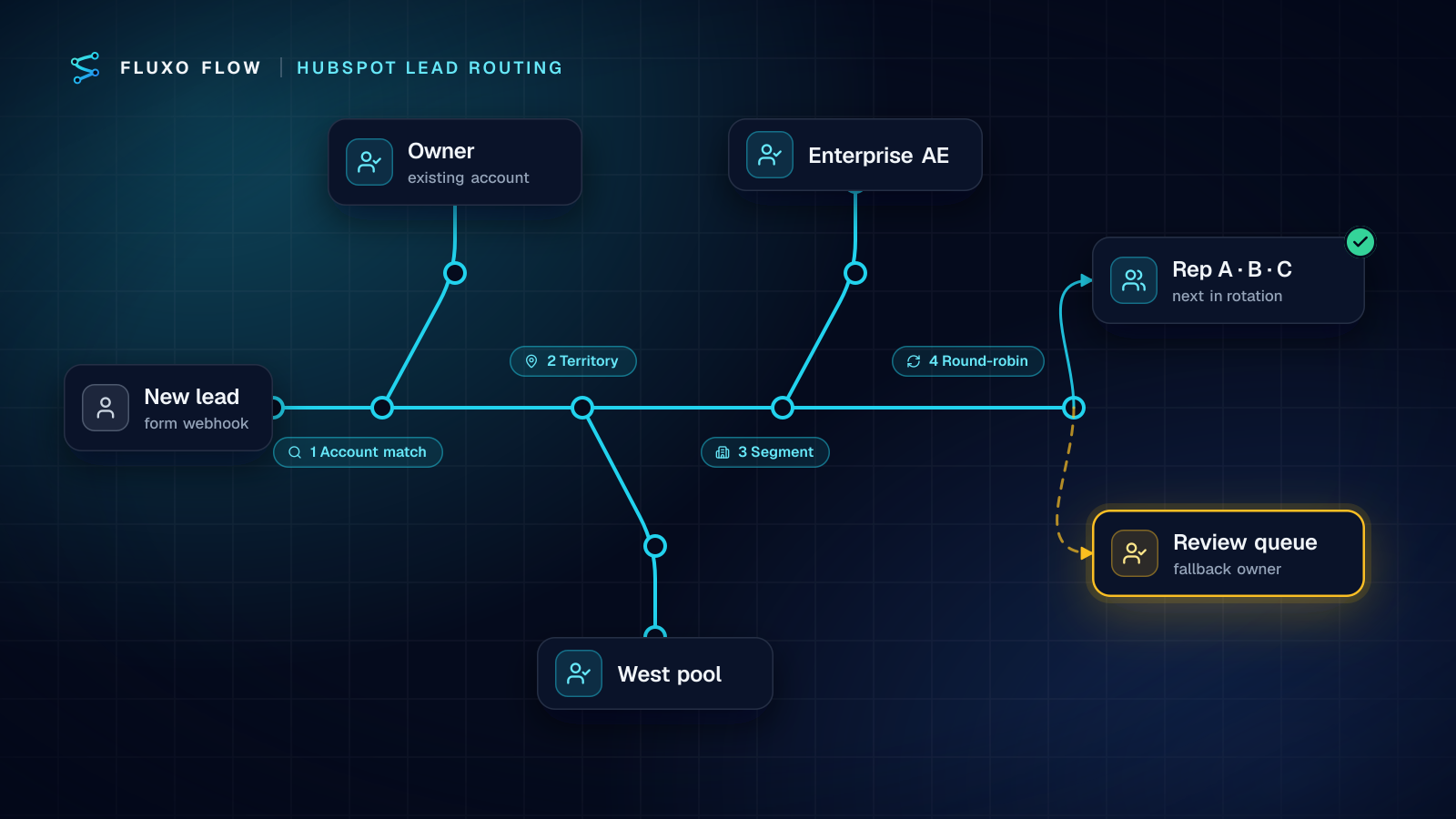
Short answer: good lead routing in HubSpot is a written policy applied in a fixed order: existing account first, then territory, then segment, then round-robin within the pool, then a fallback owner. HubSpot's "Rotate record to owner" action handles the round-robin step natively on Professional and Enterprise plans. Use an external workflow for what HubSpot can't decide from properties: matching a lead to an account that already exists, reading free-text intent with AI, and alerting the rep in Slack with context. AI reads; rules assign.
This is the setup I use for small and mid-size sales teams who've outgrown "whoever sees it first" but don't need an enterprise routing platform.
Write the routing policy first
Routing breaks down because nobody wrote the rules, not because the tooling is weak. Before building anything, fill in this template with your sales lead and get a yes:
| Step | Question | Rule (example) | If no match |
|---|---|---|---|
| 0. Disqualify | Is it a real sales lead? | Job seekers to HR, partners to partnerships, support requests to support, spam dropped | Continue |
| 1. Existing account | Does the company already have an owner? | Same email domain as a company with an owner → that owner | Continue |
| 2. Territory | Where are they? | Country or state → regional pool | Default pool |
| 3. Segment | How big are they? | Team size 200+ → enterprise pool; below → SMB pool | SMB pool |
| 4. Rotation | Who's next in the pool? | Round-robin among available reps | Pool lead |
| 5. Fallback | Nothing worked? | Sales manager's review queue | n/a |
| SLA | How fast? | Task due within one business hour for hot leads, same day for the rest | Escalate to manager |
Two things matter more than any specific rule. Order is policy: the account check must come before territory, or a new contact from your biggest customer gets round-robined to a stranger. Every lead needs an owner: the fallback is a named person, not "unassigned."
What HubSpot does natively (and does well)
Be fair to the tool you already pay for. HubSpot's Rotate record to owner workflow action (checked October 4, 2026):
- needs Sales Hub or Service Hub, Professional or Enterprise;
- assigns records "equally within a selected team or between specified users";
- offers load balanced, round robin and random distribution for lead and ticket records;
- has an "Assign to available users only" option, so users set to Away are skipped.
If your rules are all expressible as HubSpot properties (country, an employee-count field, lifecycle stage) and you have Professional, build steps 2 to 4 natively with branches and rotation. You don't need anything else for those steps.
When you need an external workflow
Native workflows struggle with four things, and these are the cases I build for:
- Matching to an existing account. A new contact from a known domain should go to the company's owner. That needs a lookup by domain before assignment, plus normalization (subdomains, country domains).
- Free-text intent. "We're evaluating vendors for Q3" and "I'd like to apply for the SDR role" arrive through the same demo form. A property can't tell them apart; a model can.
- No Professional plan. Teams on Starter have no rotation action.
- Alerts with context. A Slack message that says why the rep got the lead (account match, territory, the person's own words) gets a faster response than a bare notification.
The workflow
Build it in Fluxo Flow with the HubSpot connector and Slack, both live connectors (the HubSpot + Slack guide lists every trigger and action they share):
- Webhook trigger from your form (seconds), or HubSpot's New contact trigger, which polls on your plan's interval: every 15 minutes on Basic, 5 on Pro. For inbound demo requests, use the webhook.
- AI Generate reads the free text and returns
intent(buy, partner, support, job, spam, unclear), a cleaned company name and domain, and a one-linereason. JSON with a schema; a Validator sends anything off-schema to the fallback. - Router: disqualify. Job, partner, support and spam go to their own branches (a Slack post to HR, a HubSpot ticket for support, a log row for spam). Buy and unclear continue.
- HubSpot "Find records" on companies where
domainequals the lead's domain, returninghubspot_owner_id. - Router: routing policy. Routes in policy order: owner found → account owner; territory conditions → regional pool; team size ≥ threshold → enterprise pool; default → SMB pool.
- Assignment. HubSpot Create or update a contact (email is HubSpot's unique key for contacts, per the contacts API docs), then Update a contact with the Owner, plus custom properties like
routing_reasonandrouting_poolin the extra-properties field. - HubSpot "Create a task" for the owner, due within your SLA, attached to the contact.
- Slack "Post a message" to the rep or the team channel: who, company, intent, the reason quoted from the form, and which rule matched.
- Error Handler around the HubSpot steps, routing failures to the sales manager.
Round-robin: two options
- You have Professional: let the workflow set
routing_pooland leave assignment empty for pool leads. A HubSpot workflow enrolled onrouting_poolruns Rotate record to owner for that pool, with "available users only" on. Each tool does what it's best at. - You don't: keep a Memory key per pool holding the last rep assigned (persistent across runs). A small Router picks the next rep from the last one (A → B, B → C, C → A) and the workflow writes the new value back. It's plain and visible on the canvas, and it works fine for pools of two to five reps.
Where AI helps, and where it doesn't
AI earns its place in steps 2 and 0: reading intent, cleaning messy company names, spotting the job applicant on the demo form. It does not pick the rep. Sales teams accept rules they can read ("West Coast, 50 to 200 employees, next in rotation") and fight decisions they can't. If you want AI scoring as well, the AI lead qualification workflow adds a fit score that can set priority, not ownership.
Edge cases your policy must answer
Every routing project I've run hits the same handful of awkward cases in its first month. Decide them up front and write the answers into the policy table:
- A new contact at an existing customer. Account owner, almost always, even if the person asks for a demo of a different product. The account owner can hand it on; a stranger can't hand it back gracefully.
- Free-mail addresses. A gmail.com address has no company domain to match. Skip the account check, rely on the company name the AI cleaned up, and consider a "Find records" lookup on the company name as a weaker match that goes to review rather than straight to the owner.
- The same person submits twice. Store the email in Memory for a day and send repeats to the existing owner as a note ("submitted again: ...") instead of re-routing.
- A rep leaves or goes on holiday. With HubSpot rotation, "available users only" skips reps set to Away. With Memory rotation, remove the rep from the Router and the pool shrinks. Either way, reassign their open leads by hand; routing only handles new ones.
- Partners and resellers. Their own branch, their own owner. Partner leads round-robined to new-business reps are a classic source of internal friction.
- Territory conflicts. A company headquartered in one region with the requester in another: pick one rule (headquarters or requester location) and apply it every time.
None of these need AI. They need a decision, written down once.
Fairness and SLA tracking
Routing that feels unfair gets bypassed within a month. Make it measurable:
- Log every assignment. A Google Sheets row per routed lead: timestamp, rule matched, pool, owner. A weekly pivot shows leads per rep per pool. Uneven counts usually mean a rule is catching more than intended, not that rotation is broken.
- Track response against SLA. The HubSpot task's due date encodes the SLA; overdue tasks show up in HubSpot's own task views. Mark hot-lead tasks high priority, and have the manager check the overdue view daily for the first few weeks.
- Review the fallback queue weekly. Everything that hit the fallback is a gap in the policy. Add a rule or accept it consciously.
Speed matters more than most teams think. The best-known study, by Oldroyd, McElheran and Elkington in HBR, found firms contacting a lead within an hour were nearly seven times as likely to qualify it as those waiting even an hour longer (The Short Life of Online Sales Leads, 2011). I cover what it does and doesn't show in speed to lead automation.
Testing every route with Dry Run
Routing has more branches than almost any other workflow, and each wrong branch is a lead in the wrong hands. Before going live:
- Write one test lead per route: existing account, each territory, each segment, each disqualify reason, plus a lead that should hit the fallback.
- Dry Run each one. Dry Run simulates every HubSpot and Slack call (nothing is created or posted) and returns placeholder AI output, so you can set the AI's sample answer and confirm the Router picks the route the policy says.
- Go live with the Slack step pointed at a test channel for a few days, then compare a week of routed leads with what the sales lead would have done by hand.
The Free plan builds and Dry Runs; live webhooks and HubSpot triggers start on Basic.
The takeaway
Write the policy, put it in order, give every lead an owner, and let AI do only the reading. Use HubSpot's rotation where you have it, an external workflow for account matching and intent, and a log to prove it's fair.
Connect HubSpot, build the Router from your policy table, and Dry Run every route. The AI lead qualification template is a good starting canvas to extend. Agencies setting this up for clients can turn the routing log into the monthly report (client reporting automation) and price the build and upkeep with how to price automation services.
Frequently asked questions
Can HubSpot do round-robin lead routing on its own?
Yes, with the 'Rotate record to owner' workflow action, which needs Sales Hub or Service Hub Professional or Enterprise. It rotates evenly among users or a team, and can skip users set to Away.
When do I need lead routing software outside HubSpot?
When routing depends on things HubSpot properties don't hold yet: free-text intent, matching a lead to an existing account by domain, or when your HubSpot plan lacks rotation. An external workflow can work those out and write the result back.
Should AI assign leads to reps?
No. Use AI to read the free text (what the person wants, whether it's a job seeker or a partner) and let written rules do the assignment. Rules are explainable to the sales team; model choices aren't.
How fast does routing happen?
With a form posting to a Webhook trigger, the run starts within seconds. HubSpot's New contact trigger polls on your plan's interval instead (every 15 minutes on Basic).
Put this into practice
Build it on the canvas and Dry Run it on the Free plan, with no credit card. Run it live on a paid plan, on your own AI key.
- sales ops
- lead qualification
- HubSpot
- lead routing